Video editing in 2026 barely resembles what it was five years ago. Generative AI pulls b-roll out of text prompts, auto-transcribes hour-long interviews into tight short clips, and reframes vertical from horizontal footage with one click. For a content marketer or YouTuber, the real question isn’t “which timeline is nicest” anymore. It’s which editor takes the grunt work off your plate.
Best AI Video Editing Software 2026
Below are the 10 video editors I’d actually recommend for YouTube and social content in 2026, including classic pro tools that bolted on AI (Premiere Pro, DaVinci Resolve) and AI-native newcomers that barely existed when this post was first written (Descript, Runway, Opus Clip, CapCut). Pricing is verified as of April 2026. If you’re reading this six months later, double-check the vendor’s pricing page before you buy.
How To Choose an AI Video Editor For Your Channel
Three questions I’d ask before picking an editor:
What does your content look like? Talking-head and podcast creators get the biggest leap from text-based editors like Descript. Narrative YouTubers editing b-roll-heavy stories still need a real timeline (Premiere Pro, Resolve, Filmora). Short-form creators turning long videos into TikTok clips want Opus Clip or CapCut’s AI clipping.
How comfortable are you with a learning curve? DaVinci Resolve Studio is the most powerful tool on this list and also the steepest. Filmora, CapCut, and Descript are designed so a beginner can ship a polished video in an afternoon.
Do you want subscription or one-time? Most AI features now live behind monthly billing (Premiere Pro, Descript, CapCut Pro). DaVinci Resolve Studio at $295 one-time remains the anomaly.
1. Adobe Premiere Pro: The Flagship Pro Editor, Now With Firefly AI
Compatibility: Windows, Mac OS
User Experience
4/5
Learning Curve
3/5
System Requirements
2/5
Editing Features
5/5
AI Features
4.5/5
Premiere Pro is still the default for professional YouTubers, ad agencies, and anyone who needs to hand off projects to an editor who knows what they’re doing. What changed in the last two years is how much of the drudgery Adobe hands to AI.
Generative Extend (powered by Adobe Firefly) lets you extend a clip a few extra seconds in 4K when your cut runs short. That’s the kind of “save” that used to mean reshooting or ugly freeze-frames. Media Intelligence scans your footage and makes it searchable by what’s in the frame (“find me the shot with the red car”). Auto-caption translation now covers 27+ languages.
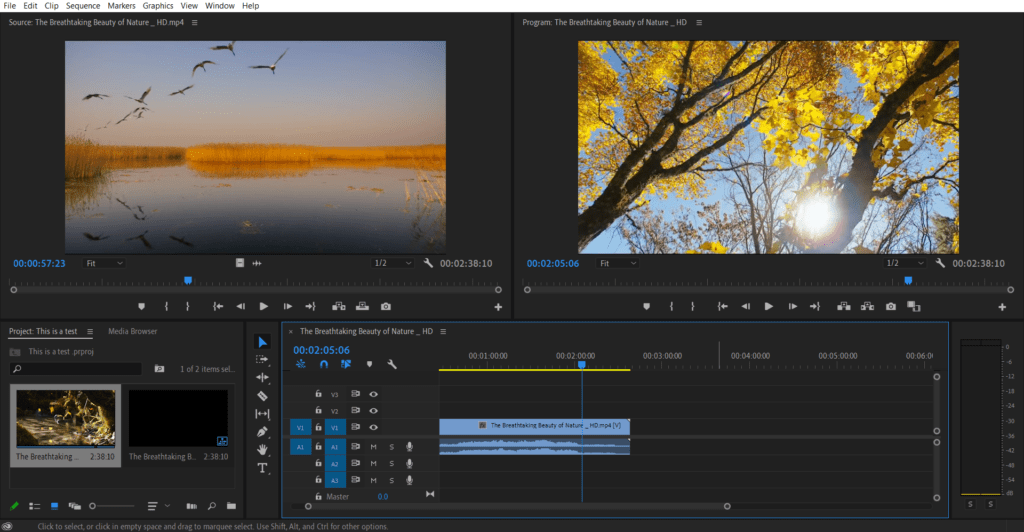
The honest downside: Premiere is still resource-heavy and crashes remain a running joke in creator Discords. If you’re on a five-year-old laptop, it’ll be painful. The AI features also consume Firefly credits on lower Creative Cloud tiers, so heavy users end up paying more than the advertised sticker.
Pricing (April 2026): Premiere Pro single app is $22.99/month (annual commitment). Creative Cloud Pro, which includes Premiere, Photoshop, Illustrator, After Effects, and unlimited standard Firefly generations, is $89.99/month. 7-day free trial available. Generative Extend is currently free-to-use with your existing plan but will eventually consume credits.
[table id=14 /]
2. DaVinci Resolve Studio: Hollywood-Grade Editing With AI Neural Engine
Compatibility: Windows, Mac, Linux
User Interface
3.5/5
Learning Curve
2/5
System Requirements
2/5
Editing Features
5/5
AI Features
4.5/5
DaVinci Resolve is what serious colorists and editors use when they’re done with subscriptions. The free version alone is more capable than most paid competitors. Studio adds the DaVinci Neural Engine, which drives Magic Mask (isolate a subject with one click, no manual rotoscoping), smart reframe for vertical exports, voice isolation, scene cut detection, and AI-based noise reduction.
What I like about Resolve’s AI: it’s not bolted on. Magic Mask in particular saves hours on subject-tracking work that used to be pure tedium.
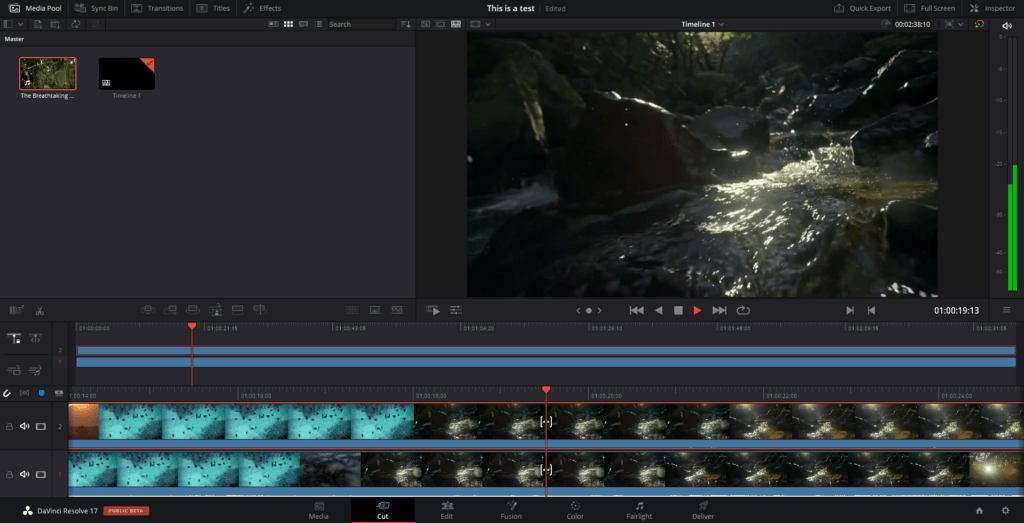
The catch is the learning curve. Resolve was built by colorists, and the interface reflects that. Expect a week of watching tutorials before you feel fluent. The system requirements are also genuinely demanding. You want a GPU with 8GB+ VRAM, not a base M1 MacBook Air.
Pricing (April 2026): Free version is permanently free with no watermark (real, not a trial). Studio version is a one-time $295 for a lifetime license, no subscription. In a subscription-heavy market, that’s the best long-term value on this list if you can handle the learning curve.
[table id=23 /]
3. Descript: The AI-Native Editor That Treats Video Like a Google Doc
Compatibility: Windows, Mac, web-based
User Interface
5/5
Learning Curve
5/5
System Requirements
5/5
Editing Features
3.5/5
AI Features
5/5
Descript is the editor I personally keep coming back to for talking-head content and podcast episodes. It transcribes your video, and then you edit the transcript. Delete a word in the text, it disappears from the video. That workflow is genuinely faster than dragging razor blades across a waveform.
Beyond text-based editing, Descript’s AI stack is deep: Studio Sound cleans up bad mic audio, Eye Contact quietly shifts your pupils to simulate looking into the lens when you were reading notes, and Overdub clones your voice for fixing a flubbed word without re-recording. Screen recording and remote multi-track podcast recording are built in.
The honest criticism: Descript is weaker for fast-cut b-roll storytelling than a real timeline editor. If your videos are tightly edited visual montages, this isn’t the right tool. It shines for interviews, podcasts, tutorials, and solo YouTubers doing commentary.
Pricing (April 2026): Free plan (60 media minutes/month, watermarked, 100 AI credits). Hobbyist $16/mo annual / $24/mo monthly (10 hours, 400 AI credits). Creator $35/mo (30 hours transcription, 4K export, unlimited AI editing, 1TB storage). Business $65/mo (Brand Studio, collaboration). Enterprise custom.
4. CapCut: The Free AI Editor That Ate Social Video
Compatibility: Windows, Mac, iOS, Android, web
User Interface
4.5/5
Learning Curve
5/5
System Requirements
5/5
Editing Features
4/5
AI Features
4.5/5
CapCut became the default editor for TikTok, Reels, and Shorts creators by being actually free and surprisingly capable. The desktop app has a multi-track timeline, keyframe animation, chroma key, speed ramping, and a huge library of templates, all on the free tier.
The AI toolkit on Pro is where it earns its keep: Long Video to Shorts scans uploaded footage and proposes clip candidates, auto-captions are fast and accurate, text-to-speech handles voiceovers across many voice styles, and the AI script generator drafts copy from a topic prompt.
The catch: CapCut is owned by ByteDance, which means the usual data-residency and privacy concerns apply if you’re exporting content for enterprise or government-adjacent clients. Templates and effects marked Pro export with a watermark on the free tier, which pushes casual users toward upgrading.
Pricing (April 2026): Free (1080p export, basic AI, watermark on Pro templates). Standard ~$9.99/mo (no watermark, full templates). Pro ~$19.99/mo or $179.99/year (4K export, full AI toolkit, 100GB+ cloud, team collaboration).
5. Runway: Generative AI Video for Creative Work
Compatibility: Web-based
User Interface
4/5
Learning Curve
4/5
System Requirements
5/5
Editing Features
3/5
AI Features
5/5
Runway isn’t a timeline editor. It’s a generative video studio. Gen-4.5 turns text prompts into short clips, and Gen-4 Turbo does image-to-video at a fraction of the credit cost. For explainer videos, social ads, and concept work where you can’t or don’t want to shoot, it’s genuinely useful.
I’d frame Runway as a complement to Premiere or Resolve rather than a replacement. You generate the b-roll, stock-replacement clips, or stylistic moments in Runway, then cut them into your real timeline elsewhere.
Based on Runway’s published pricing and credit math: Gen-4.5 costs 25 credits/second, Gen-4 Turbo costs 5 credits/second. The Standard plan at $28/month gets you about 7.5 minutes of Gen-4 video. Heavy users burn through credits fast, so budget accordingly.
Pricing (April 2026): Free (125 one-time credits, Gen-4 Turbo only, 5GB storage). Basic $12/mo. Standard $28/mo (625 credits/mo, full Gen-4.5 access). Pro $76/mo (2,250 credits, 4K, watermark-free, 500GB). Unlimited $188/mo (explore mode for unlimited relaxed-quality generations). Annual billing saves 17-21%.
6. Opus Clip: Turn Long Videos Into Short-Form Clips
Compatibility: Web-based
User Interface
4/5
Learning Curve
5/5
System Requirements
5/5
Editing Features
3/5
AI Features
4.5/5
Opus Clip is a single-purpose tool: feed it a long YouTube video or podcast recording, and it produces vertical short clips with captions, auto-framed on the speaker, ranked by a “Virality Score” that flags the most shareable moments.
For creators building a distribution layer on top of long-form content, this is the shortcut. You get 10-20 clips out of a one-hour video in a few minutes.
What it isn’t: a precise editor. The AI is good at identifying punchy moments but you’ll still want to review clips before posting. The framing misreads occasionally, and the Virality Score is directional, not gospel. Based on reviews aggregated across G2 and independent 2026 reviews, the watermark on the free tier and 3-day clip expiration are the common complaints.
Pricing (April 2026): Free (60 credits/mo, watermark, 3-day expiry). Starter $15/mo (150 minutes, 720p, no watermark). Pro $29/mo or ~$14.50/mo annual (300 minutes, 1080p, virality score, multi-platform auto-posting, speaker detection, brand kit). Business custom (API access, priority processing).
7. Wondershare Filmora: AI Copilot for Intermediate Creators
Compatibility: Windows, Mac
User Experience
4/5
Learning Curve
4.5/5
System Requirements
4/5
Editing Features
4/5
AI Features
4/5
Filmora (Wondershare dropped the “9” and “X” suffixes years ago) has positioned itself as the middle-ground option: more powerful than CapCut, far cheaper and easier than Premiere. Its AI Mate copilot generates scripts, suggests cuts, and applies effects based on text prompts. Useful for beginners who don’t know where to start.
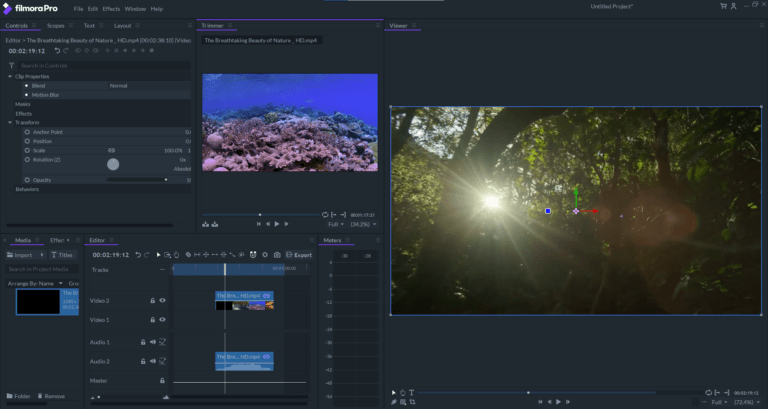
Other meaningful AI: Smart Cutout for one-click subject isolation, speech tools (TTS, speech-to-text), AI audio denoise, auto-captions, and AI thumbnail generation. Free users still get 50 AI Mate queries without paying.
The honest criticism: Filmora’s pricing is confusing. Basic ($49.99/yr) gives you the editor but locks out most AI features. Premium ($99.99/yr) is what most people actually want, and the naming doesn’t make that obvious. Stability on Windows has improved, but I still see forum complaints about exports failing on older hardware.
Pricing (April 2026): Basic $49.99/year (editor only, limited AI). Premium $99.99/year (all AI tools, premium assets). Perpetual $79.99 one-time (lifetime access to current version, no future major updates). Free version available with watermark.
[table id=15 /]
8. CyberLink PowerDirector: Low-Cost With a Serious AI Suite
Compatibility: Windows, Mac
User Interface
3.5/5
Learning Curve
3.5/5
System Requirements
4/5
Editing Features
4/5
AI Features
4/5
PowerDirector has quietly become one of the most AI-feature-dense editors at its price point. The 2026 version bundles AI Object Mask (auto-detect and mask any object), AI Background Remover (no green screen needed), AI Audio Denoise, AI Frame Interpolation (turns grainy footage into smoother renders), speech-to-text captions in multiple languages, and AI sky replacement.
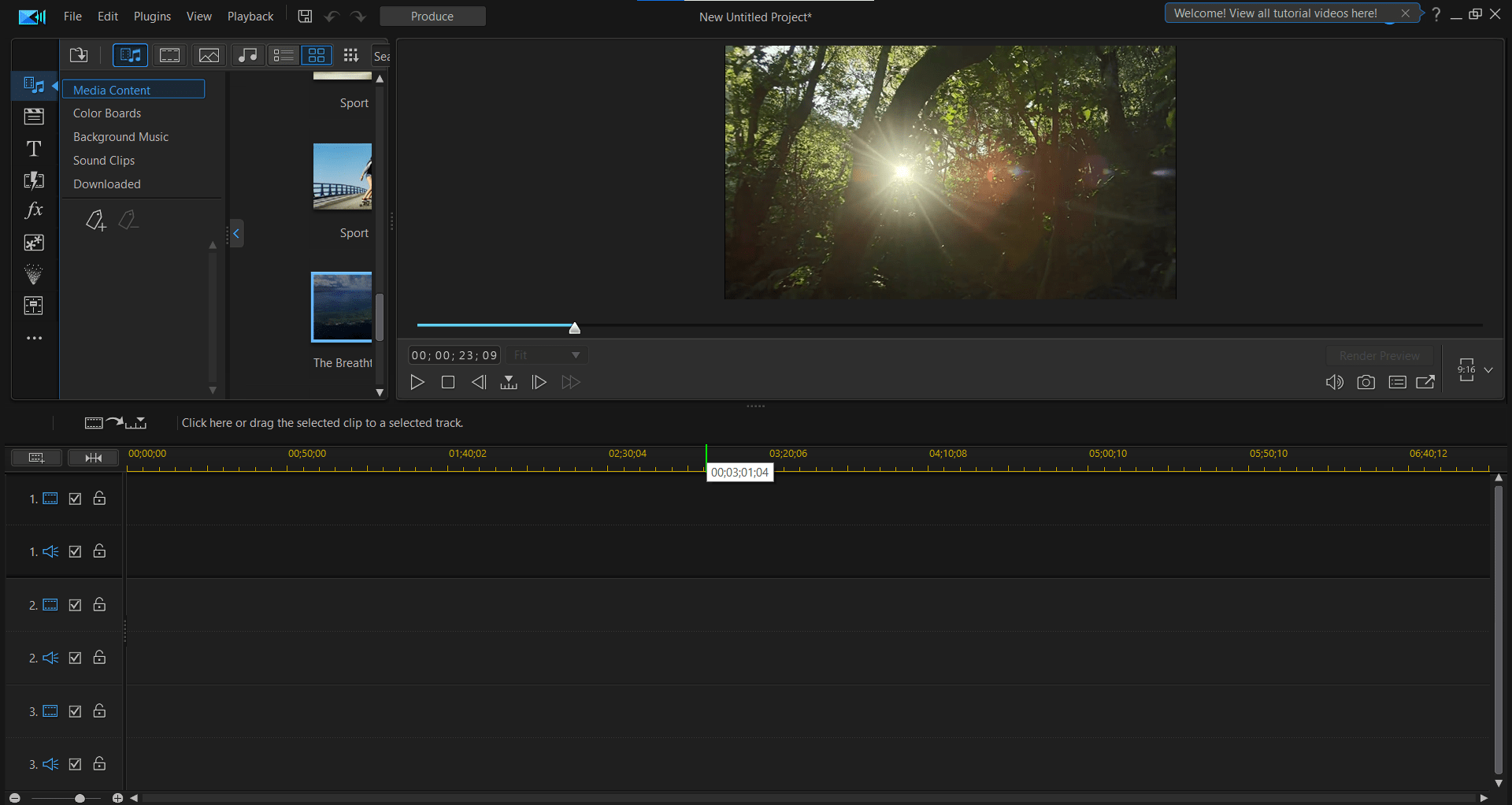
Common criticism from 2026 reviews: pop-up upsells for additional effect packs, a somewhat dated UI compared to Filmora or CapCut, and a learning curve that’s steeper than the marketing suggests. Still, based on published pricing, it’s the cheapest way to get this many AI features on a lifetime license.
Pricing (April 2026): PowerDirector 365 subscription $69.99/year or $19.99/month (all features, content packs, cloud storage, ongoing updates). Ultra one-time $99.99 (core features). Ultimate one-time $139.99 (includes additional effects and plugins).
[table id=24 /]
9. Lightworks: Pro Editor With a Free Tier That Actually Works
Compatibility: Windows, Mac, Linux
User Experience
3/5
Learning Curve
2/5
System Requirements
3/5
Editing Features
4/5
AI Features
3/5
Lightworks has real Hollywood editing lineage (Pulp Fiction, The Wolf of Wall Street) and stays on this list because its free tier remains generous enough to ship serious work. The 2026 Pro version added AI-assisted auto-editing and smart audio sync, though its AI stack lags behind Premiere Pro or Resolve.
The free plan limits export to 1080p and a narrow set of formats, which pushes serious users up the ladder. Speed and stability are genuine strengths. It’s noticeably lighter on system resources than Premiere or Resolve.
Pricing (April 2026): Free tier with 1080p cap. Create plan $9.99/month (4K, broader format support). Pro $23.99/month (full feature set, premium effects). Annual billing discounts available.
[table id=17 /]
10. Blender: Free, Open-Source, Best for 3D-Heavy Work
Compatibility: Windows, Mac, Linux
User Interface
2.5/5
Learning Curve
1.5/5
System Requirements
3/5
Editing Features
3/5
AI Features
2/5
Blender isn’t primarily a video editor. It’s a 3D modeling and animation suite that happens to ship with a capable Video Sequencer. For creators doing 3D motion graphics, game-engine-style animation, or VFX-heavy work, Blender is hard to beat at its price (free).
As a pure video editor, it’s fine but uninspired. The AI features are thin compared to the rest of this list. Community add-ons exist, but nothing baked-in rivals Magic Mask or Generative Extend.
Pricing: Free, forever. No paid tier.
[table id=18 /]
Comparison Table
[table id=25 /]
How I’d Choose in 2026
If you edit talking-head YouTube, podcasts, or tutorials: start with Descript. The text-based workflow is a 10x productivity jump for this content type.
If you’re a social-first creator posting to TikTok, Reels, and Shorts: CapCut (free) for editing, Opus Clip to turn long content into short clips.
If you’re a pro or semi-pro YouTuber with b-roll-heavy storytelling: Premiere Pro if you’re in the Adobe ecosystem, DaVinci Resolve Studio if you want one-time pricing and don’t mind the learning curve.
If you’re a beginner who wants AI help without the price tag: Filmora Premium or CyberLink PowerDirector 365.
If you need generative AI b-roll (text-to-video, image-to-video) for ads, explainers, or stylistic shots: Runway alongside your main editor.
Sure, any of these tools has quirks and edge cases. But for the first time, the bottleneck on video production isn’t the editor. It’s what you have to say.

Written by
Rochi Zalani
A former staff writer at Elite Content Marketer, Rochi is a closet poet and a productivity nerd. When not whipping up SaaS content, she’s writing bookish essays on her website, rochizalani.com, and chatting with her newsletter community. If you believe there’s nothing that can’t be cured by some fresh poetry and an F.R.I.E.N.D.S episode, reach out to her on Twitter.
View Profile →Related Articles
AI Tools & Software
Teachable Vs. Thinkific: Exhaustive Comparison
Thinkific and Teachable are consistently ranked among the best online course platforms on the first and second spots. But which one of them is better suited for your online education business requirements without breaking the bank? Let’s break down Teachable vs. Thinkific course platforms. Note: This article contains affiliate links. ... Read more
Apr 8, 2026Read more →
AI Tools & Software
Kajabi Vs. Teachable: Which Is The Better Course Platform
Kajabi and Teachable are popular online course platforms. Both have their share of pros and cons — but which one’s the best suited for your needs? Let’s break down the Kajabi vs Teachable debate in this article. Overall, I’d recommend going for Kajabi if you’re a pro-creator and need a ... Read more
Apr 8, 2026Read more →
AI Tools & Software
Best Creator Tools to Build, Monetize, and Profit
Here is our curated list of top tools you can consider as a content creator. I’ve divided them across categories for different use cases. Note: Some of these use affiliate links, so if you buy through our link, we may make a commission (at no cost to you). Thanks for ... Read more
Apr 8, 2026Read more →