I’ve been writing for a living since 2014, and I still run every long-form article through Grammarly before it ships. But I’ve also watched AI-first writing tools miss basic errors while confidently rewriting perfectly fine sentences. So this round-up is about practical fit: which checker actually makes your writing better, which ones have genuine AI features versus marketing spin, and which are worth paying for in 2026.
I tested each tool using the same article pasted into the editor with deliberate contextual errors, punctuation slips, and awkward phrasing. Pricing is current as of April 2026. Where a tool added AI generative features since the last round of testing, I’ve noted what it actually does and where it falls short.
Research Process: How I Ensured Unbiased Evaluation
I started by copy-pasting one of the articles from our website onto different grammar checking softwares. I ensured that I used the same content (till point #2) in all the softwares. I deliberately made contextual, spelling, and punctuation mistakes (the same ones) in all the software(s).
In this manner, I could check if a software missed any detail caught by another software as an error, at one go. This process also made it easy to compare the scores and the writing analysis reports.
For the purpose of comparison, I either used the web-version or the desktop app or both for all of the softwares listed here.
Before I begin, there are things you should keep in mind when evaluating grammar checking software amongst each other. To know which one will work the best for you, you should know what editing features you value over others.
Choosing A Grammar Checker: Important Factors
There are certain factors that you should consider before you decide on a grammar checking software. Keep these pointers in mind as you evaluate all the softwares listed below:
- Your Use-Case: Are you using a grammar checker to check:
- non-fictional content,
- or for a fictional book you’re writing,
- or is it merely to check grammar,
- syntax and punctuation for emails and other formal communication?
Your answer would decide what kind of features you would require. If you are writing fiction, an in-depth writing analysis may help you more than just signifying ‘goals’ for your writing. But if you are writing only for professional reasons, the ‘goals’ and ‘tone’ features may be essential.
- Your Frequency of use: If you consider using a grammar-checking software for professional reasons, a premium version will suit you best and would be worth evaluating. But if you are going to use the grammar checking software to check occasional emails or social media copy, then investing in premium plans may not be worth it.
- Your Accuracy and Readability Requirement: Do you need your writing to be just grammatically correct, or do you need to enhance its readability to keep your readers engaged? If accuracy is more important to you than styling features, place more emphasis on those while evaluating these software(s). However, if you value style and structure more than (or as much as) accuracy, consider evaluating this feature in your grammar checking tools.
- Your Availability Requirements: Do you need a software that works perfectly on your desktop, and you are not concerned if it’s available on your phone? Or are you someone who edits on-the-go and requires an efficient mobile app? Maybe you are somebody who prefers to write offline and would go for softwares with desktop apps that work without an internet connection.
- Your Budget: Lastly, you should have a budget in mind on how many dollars you are willing to spend on a grammar checking software. You can base this on the first four pointers listed above – whether your requirements and demands for a grammar checking software is high or low.
1. Grammarly: The Default Choice, Now With Generative AI Baked In
Grammarly is still the default for most content marketers I know, and the 2023 addition of GrammarlyGO (now just called Grammarly’s generative AI features) turned it from a corrector into an end-to-end writing assistant. You can ask it to rewrite a paragraph, shorten it, change the tone, or generate from a prompt — all inline in the same editor where it catches your grammar mistakes.
AI features added since 2023
Grammarly’s generative AI can now draft replies, summarize documents, adjust tone (confident, friendly, professional), and rephrase sentences. It also has “Knowledge” — you can feed it style guides or brand voice documents and it’ll enforce them. For teams, this is actually useful. Solo writers mostly use the inline rephrase and tone controls.
Availability
Grammarly is available as a desktop app, a web-based app and as a Chrome extension. The grammar software is also available on iOS and Android.
Key features
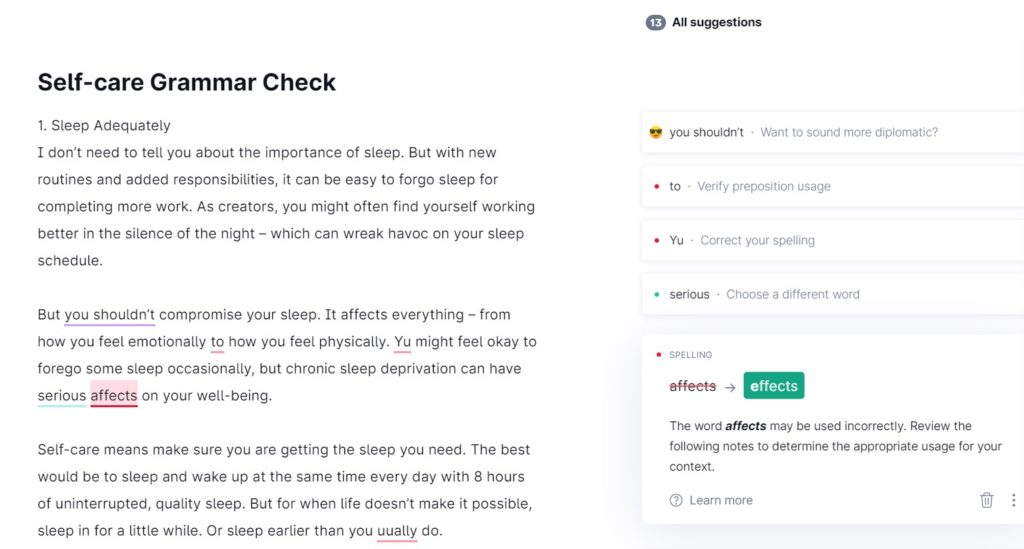
Grammarly is one of the most accurate correctors of your grammar, punctuation, and contextual errors. The process of correction is quite straightforward and user-friendly. I like how there isn’t too much information in the suggestions – it is short, simple, and digestible.
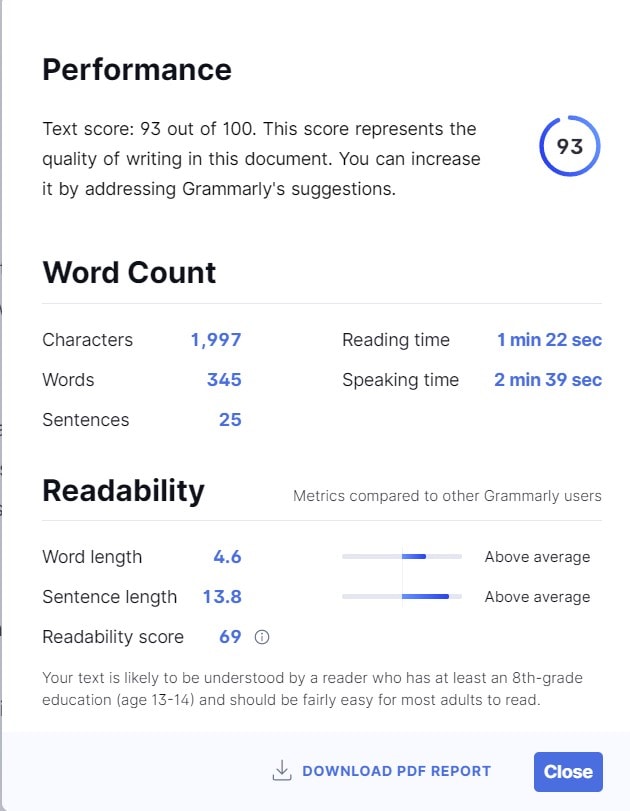
You also get a quick overall report on your writing that is downloadable as a PDF. This can be useful for a short writing analysis for writers of all genre:
You can choose to set goals on how you want your writing to sound like, and you can also check your writing for plagiarism, which is immensely accurate and quick. You can double click a word to find its synonyms.
There is no personal dictionary feature, nor a simple dictionary, or a translator available at Grammarly. This can be troubling for non-native English speakers.
Pricing
The free tier still covers basic grammar, spelling, and punctuation. Grammarly Pro (the renamed Premium tier) is $12/month billed annually, or $30/month month-to-month. Grammarly Business is $15/member/month billed annually and adds admin controls, brand voice, and style guide enforcement. The AI prompt allowance is generous on Pro and essentially unlimited on Business.
What I don’t like: the “goal setting” flow feels bloated for anyone doing quick edits, and the rephrase suggestions sometimes strip voice down to a neutral corporate tone. Turn off the suggestions you don’t want or you’ll end up sounding like a LinkedIn thought leader.
Strengths and Weaknesses
Strengths
- Accurate grammar checking software
- Quick and easy-to-use interface
- Concise suggestions and overall report
- Accurate and quick plagiarism checker
Weaknesses
- Translation feature is not available
- Dictionary not available
2. ProWritingAid: Deepest Writing Analysis, Plus Genuinely Useful AI Rephrase
ProWritingAid remains the tool I’d pick for anyone writing long-form fiction or technical content. The reports dig deeper than Grammarly: overused words, pacing, sentence variety, cliché detection, echoes. In 2024 they added “Rephrase” powered by their own AI models, and honestly, it works better than I expected — it preserves voice more than Grammarly’s rewrites do.
AI features (2026 update)
ProWritingAid’s AI Sparks can generate alternate sentence structures, add dialogue, expand descriptions, or change perspective. For fiction writers, this is useful. For content marketers, the “Rephrase” tool inside the editor is the feature you’ll use daily. Based on G2 reviews, the one complaint that shows up repeatedly is latency — the AI features take a few seconds to return, which breaks flow.
Availability
ProWritingAid is available as a web-based app by creating an account, a desktop app, and as a Chrome extension.
Key features
ProWritingAid remains as one of the most accurate grammar checking tools in the market. The software highlights every possible grammatical error, style improvement, and punctuation mistake.
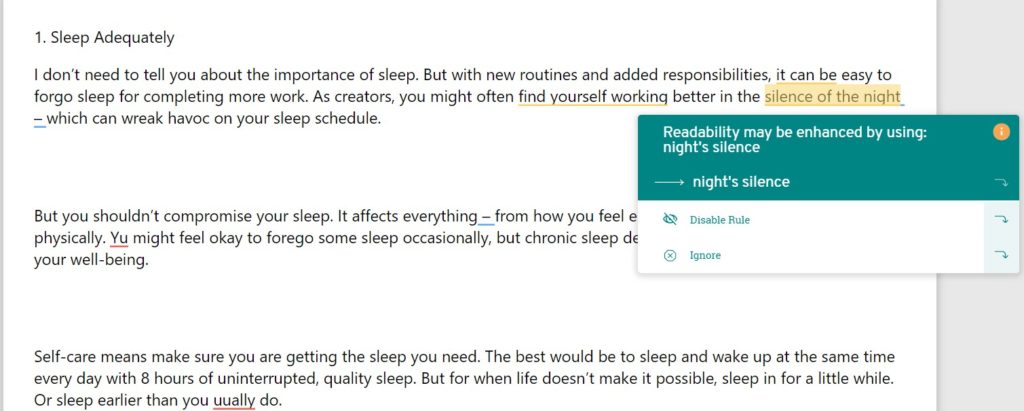
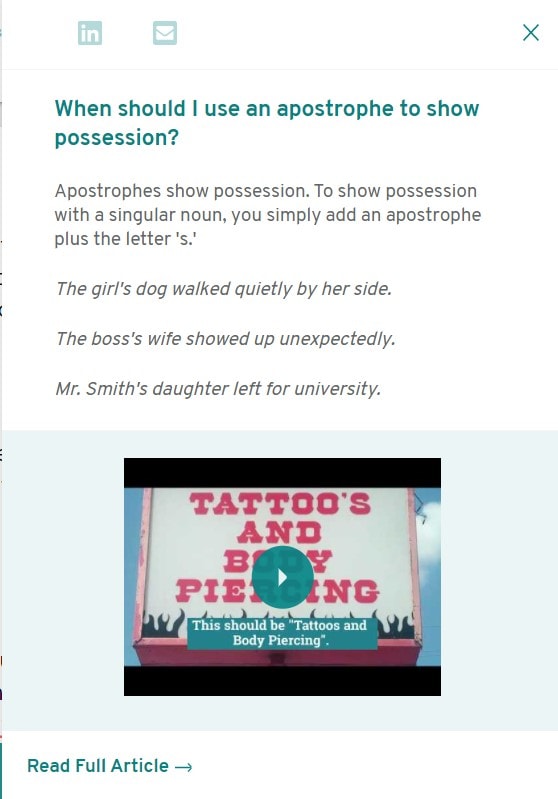
You can also disable this rule, which can be useful for fiction authors’ with regard to the character names in their writing. Clicking on the orange “i” will also tell you more about the particular suggestion provided by the software. This can be useful for non-native English writers.
The feature analysis includes a printable summary report, which is my favorite part of the whole software. The only drawback is that it is too long to be a ‘summary’ report. But the report can offer you a personalized, in-depth analysis of your writing, which can be immensely beneficial.
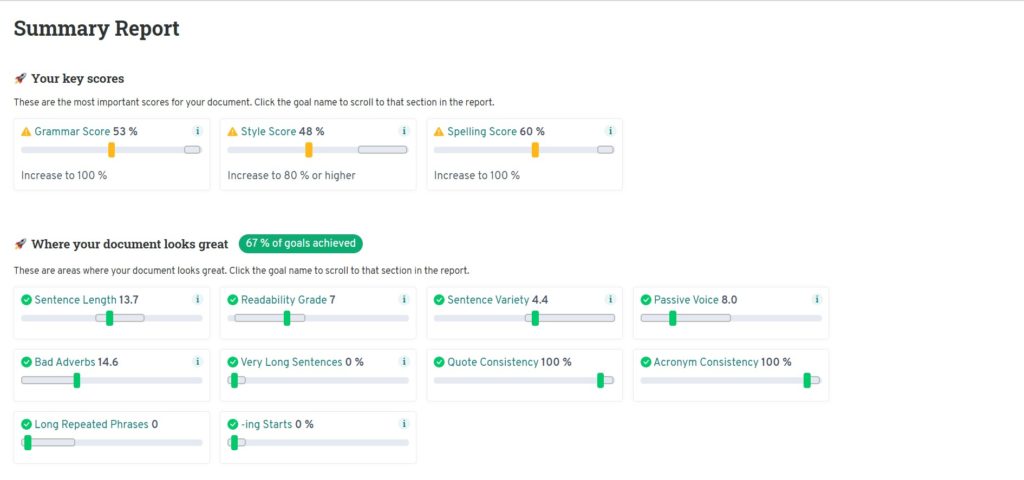
There is an option of “More Reports” available on the software to get even deeper into your writing. There is a feature called “Echoes” to tell you which phrases and/or words you have overused in your writing. The whole dashboard is a repository to nitpick delicate details in your writing and give you valuable insights.

However, the app can be a little slow, and its user-interface is not the best, compared to its competitors.
Pricing
ProWritingAid has a free version but it is limited to a maximum of 500 words. The premium version offers three plans, but this does not include the plagiarism checker. The software offers a 14-day guarantee to all the three plans.
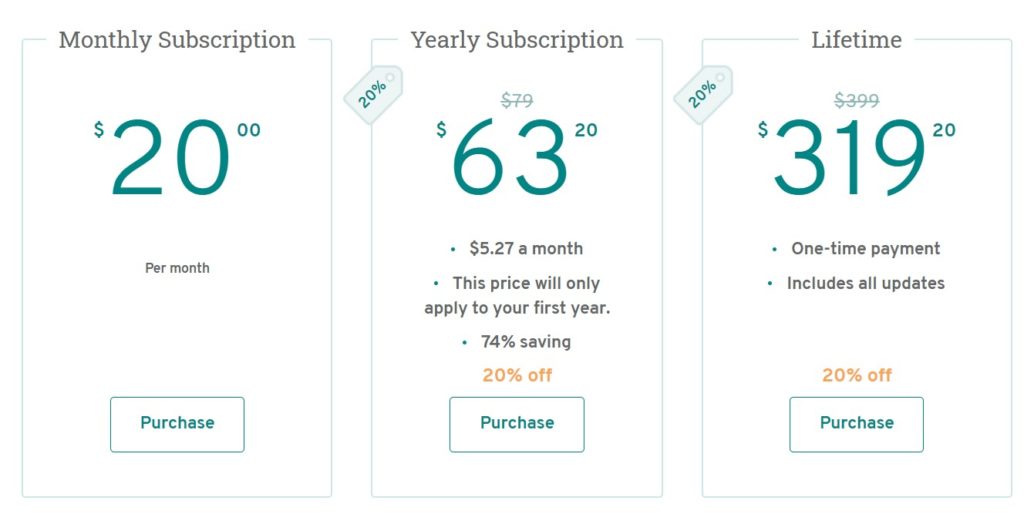
If you want to include a plagiarism checker to your plan, you have to try their premium plus plans. But you can purchase plagiarism checks on a per usage basis separately.
Strengths
- More significant writing insights available via a repository of articles
- Comprehensive reports and analysis of your writing
- Accurate grammar, punctuation, and spell checking
- ‘Disable Rule’ feature
Weaknesses
- Complicated pricing plans
- Its too slow to load
- Unpolished user-interface
- Long “summary” report
Strengths and Weaknesses
Strengths
- More significant writing insights available via a repository of articles
- Comprehensive reports and analysis of your writing
- Accurate grammar, punctuation, and spell checking
- ‘Disable Rule’ feature
Weaknesses
- Complicated pricing plans
- Its too slow to load
- Unpolished user-interface
- Long “summary” report
3. WhiteSmoke: Solid For ESL Writers, But The AI Story Is Thin
WhiteSmoke still occupies a specific niche: writers whose first language isn’t English and who want grammar tutorials, 55+ language translations, and built-in templates alongside their grammar checker. It’s been around since 2002 and hasn’t aggressively added generative AI, which in 2026 feels like a gap.
AI features (or lack thereof)
WhiteSmoke’s marketing mentions “AI-powered” corrections, but in practice the experience is still closer to a traditional rule-based checker with template generation. No inline rephrase, no tone shift, no draft generation. Based on WhiteSmoke.com’s published features and recent user reviews, if you want AI writing features, this isn’t the tool.
Availability
WhiteSmoke is available as a desktop app and also has a web-version. Their website claims that the software is available in the form of mobile applications, but they have been discontinued.
Key features
WhiteSmoke has a translator and a dictionary for over 50 languages, along with a plagiarism checker. The grammar corrections give you a total score out of 10, examining your sentence length, structure, word choice, etc.
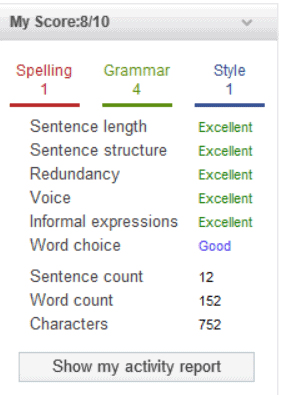
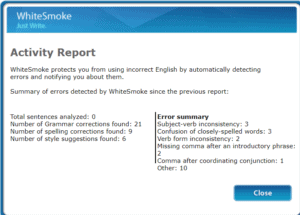
The “activity report” gives you an error summary that only opens on the web-version of the software and does not work on the application. But overall, the analysis is not as comprehensive as its competitors.
The web-version allows your writing to remain formatted, which is a feature I liked, and I hope it can be incorporated into the mobile application too. You can check the reasons behind a suggestion, which also tells you “How to use” the particular text. This can be particularly helpful for someone who has English as their second language.
The “Writing Tutorials” also provide the same function. There are also many built-in templates if you want to draft something quickly
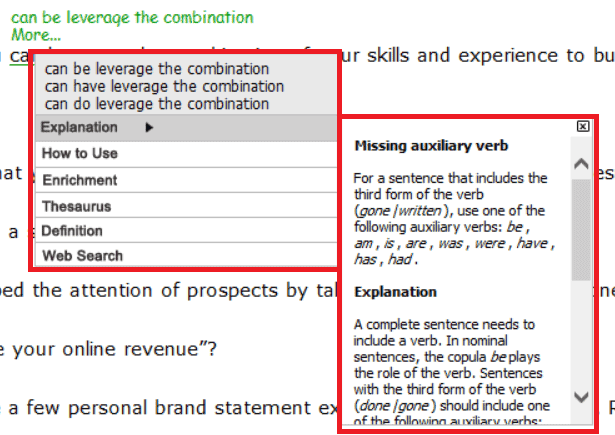
The plagiarism checker runs your text through billions of websites and research material to ensure your text is authentic. But it is a little slow and inaccurate. It will monitor every single word pasted and give you many results that are inapplicable and useless. Anything that is remotely familiar to the writing marked as plagiarism. You can also only check 10,000 characters at a time.
Pricing
There are three plans and two billing periods available on WhiteSmoke. No monthly plans, free versions or trials are available for using the software. You can, however, request a cancellation within seven days of purchasing WhiteSmoke.
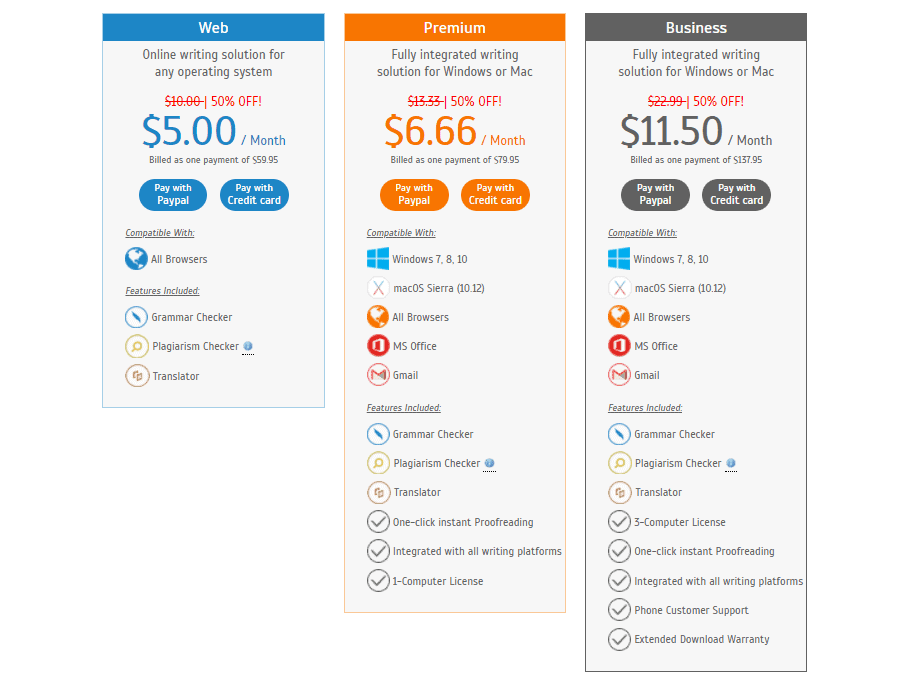
Strengths and Weaknesses
Strengths
- Translator for over 50 languages
- Pre-built templates
- Writing tutorials available
- “How to use” feature for every error/suggestion
Weaknesses
- No monthly plans available
- No free version or free trial available
- 10,000 character limit
- Faulty plagiarism checker
- Limited writing analysis
4. Ginger: Rephrase Engine Is Decent, But The Desktop App Is Still Flaky
Ginger Software’s core pitch is grammar correction plus sentence rephrasing, and they’ve updated the Rephrase feature with AI since the last round of testing. It works reasonably well for short sentences.
AI features (2026 update)
Ginger’s AI rephrase now handles longer passages and offers multiple variants per sentence, which is useful. That said, based on recent reviews on Trustpilot, the Windows desktop app still has stability complaints, and the browser extension doesn’t work consistently outside Chrome and Safari. If you’re on Brave, Firefox, or Arc, you’ll hit friction.
Availability
It is available as an extension in Chrome and Safari, as a mobile application on iOS, Android and on Windows. Installing the app and signing in was a task as it caused my laptop to hang multiple times.
Key features
Unable to use the application, I tried to use the web extension. The software worked perfectly on Chrome, but not on the Brave browser. It might be something to keep in mind if you don’t use Chrome or Safari.
The Ginger software also has a translator with 60+ languages. Along with that, you can also easily find synonyms of words by double-clicking them or simply searching for their meaning in the dictionary.
On examining the browser extension, I found that the grammar and spell-checkers worked but were a little slow compared to other softwares in the market. It also could not detect that I had misspelled ‘You’ to’Yu.’ This means you might have to proofread writing again since Ginger can miss these small errors.
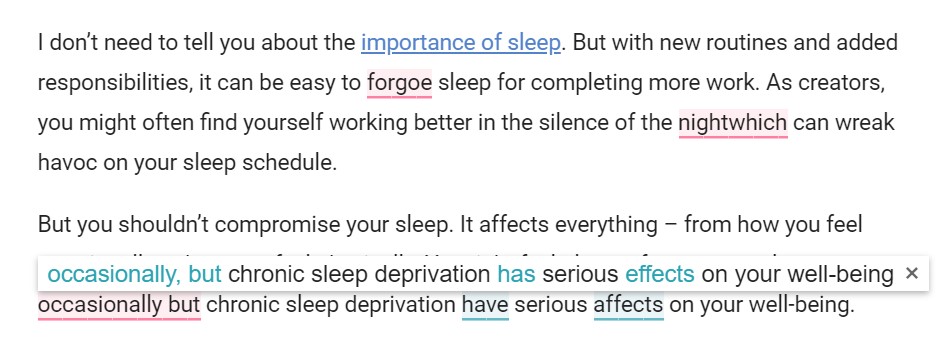
If you want to change up your sentences, try its “Rephrase” feature. Here’s an example:
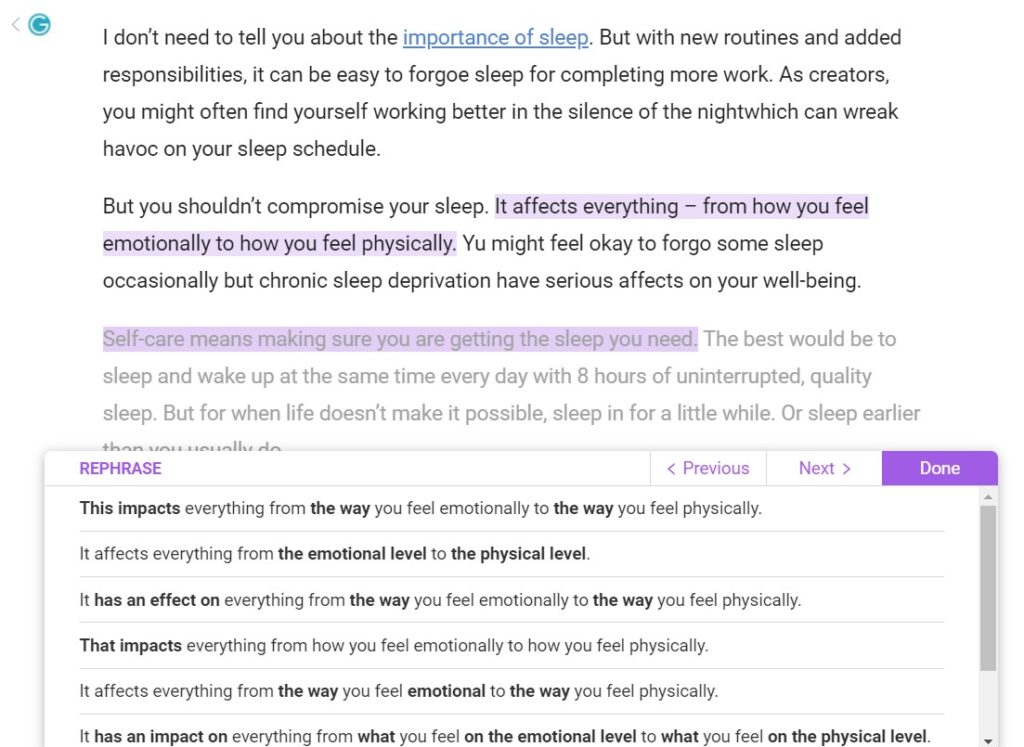
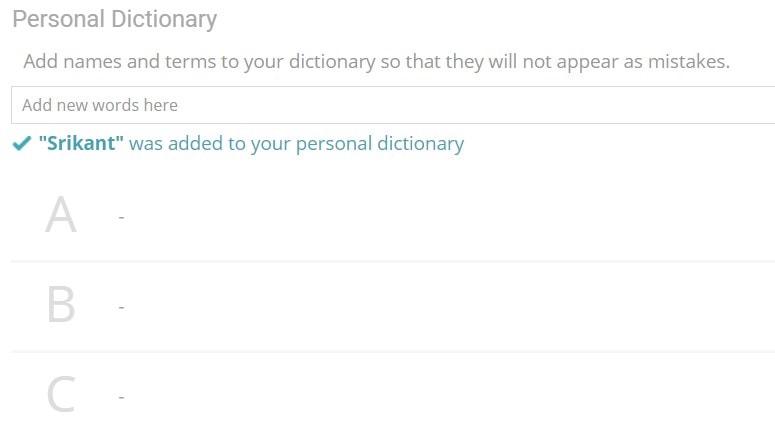
Apart from this feature, I also adore the “Personal Dictionary” feature. Here, you can add words that you commonly use for writing purposes (like character names) that appear as mistakes. Highlighting them in your dictionary prevents the software from marking them as mistakes. This would be a useful feature for authors who have a lot of character names embedded in their writing.
The downside to Ginger, apart from its faulty Windows application and the fact that it does not work on Brave browser, is that it does not have a plagiarism detector. Additionally, if you wanted to check for advanced features like subject-verb agreement, it is only available in the paid version.
Pricing
Ginger offers a free plan with some character and grammar limitations. Apart from advanced grammar checks, the premium version also provides a virtual writing tutor who can provide you with grammar lessons and tests. This can help non-English speakers tremendously. The translation feature is only available in the premium version.

Strengths and Weaknesses
Strengths
- Free version available
- Rephrasing sentences feature
- Personal dictionary feature
- Available as an extension, desktop app and mobile app
- Translator available for over 60+ languages
- Personal virtual writing trainer in the paid version
Weaknesses
- No translator and advanced grammar checks in the free version
- No plagiarism detector
- It may not work in all browsers
- Windows application is not efficient
- May miss common, small spelling errors
- There's limited capacity in the free-version
LanguageTool is open-source at the core and the best-value grammar checker if you want multi-language support (30+ languages, including European variants most US tools ignore). It integrates with Google Docs, Microsoft Word, Edge, LibreOffice, and has solid browser extensions for Chrome, Firefox, and Edge.
AI features (2026 update)
LanguageTool Premium added an AI rephrase feature in 2024 that rewrites sentences with options for formal, casual, or simplified tones. It’s not as polished as Grammarly or ProWritingAid, but at roughly a third of Grammarly’s price, it’s the best value-for-money pick I know. Based on its GitHub activity and user feedback, updates are regular and the open-source community contributes meaningfully to rules.
Availability
Language Tool is available for free as a browser extension, Android App, and Microsoft Store. While writing this, I could not find any iOS version of the app or a desktop app of the software.
Key Features
Language Tool is an excellent grammar checker software. It highlights advanced “suggestions” (don’t use different spellings of the same word in one text), common grammatical errors, and spelling mistakes. You can double click a word to get its synonyms. You can also get a word/sentence/synonym count at the bottom.
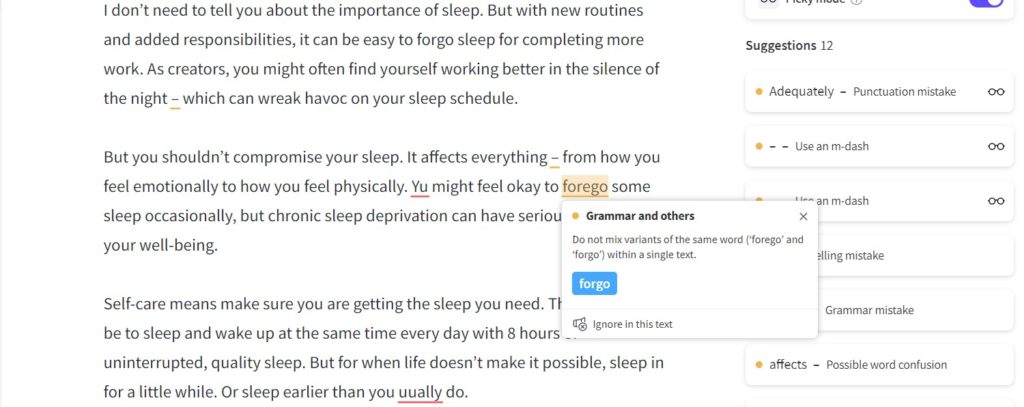
There is also a “picky mode” feature, which can come in super handy for the times when you just want to quickly proofread your documents for significant errors without nitpicking them for edits. Turn it on, and you will get only flawed (or changeable) errors in your document.
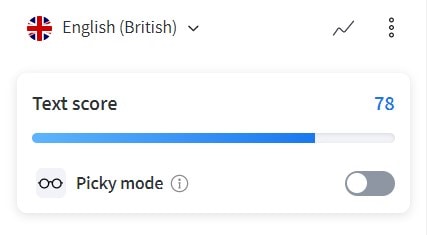
It also offers to check your text in many different languages (list available here), so it is handy for multilingual writers. You can also get a quick analysis of your writing and the text you analysed by clicking on the “Text Score”
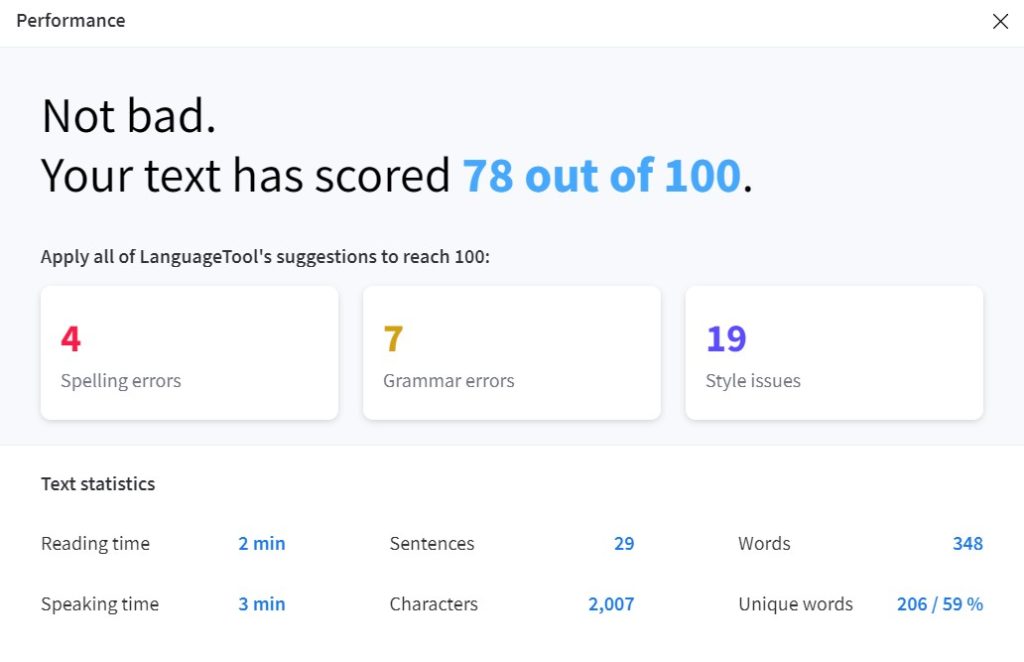
It also has a “Personal Dictionary” feature available like Ginger.
Pricing
LanguageTool is free to add as an extension and download in Chrome. However, the free version is limited only to 20,000 characters. If you want to check any more than that, you would have to buy the software’s premium version.
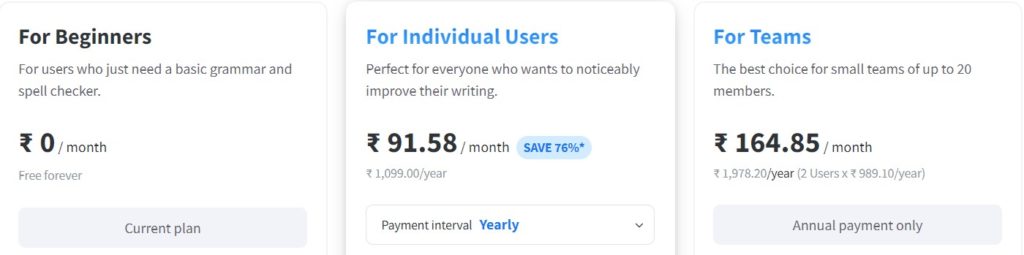
The “For Teams” plan would be useful for companies or multiple editors collaborating on writing projects. If you have more than 20 users, you need to personally contact LanguageTool for custom pricing.
Strengths and Weaknesses
Strengths
- Reliable grammar checking software
- Picky mode feature
- Quick writing analysis with “Text Score”
- Translation for over 20 languages
- Personal Dictionary Feature
- Can choose to permanently or temporarily save the writing you edit
Weaknesses
- Free version limited to 20,000 characters
- iOS/Android App not available
- The slight learning curve to utilize all the features
- The premium version does not highlight all the style issues
6. Microsoft Word + Copilot: Grammar Plus Full Document Generation
Microsoft Word’s built-in Editor has gotten steadily better, and with Microsoft 365 Copilot (an add-on to the Word subscription), you now have full AI drafting, summarization, and rewriting inside the same document where you check grammar. For anyone already in the Microsoft 365 ecosystem, this is the most frictionless AI writing stack.
AI features (2026 update)
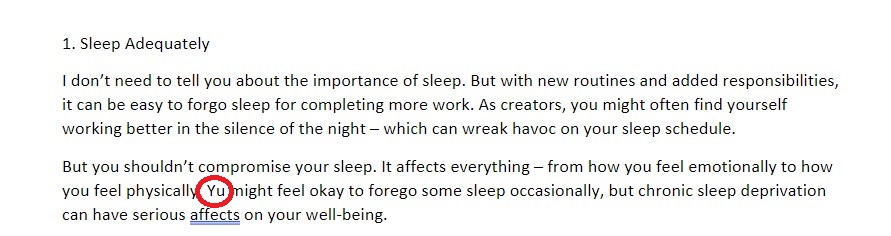
Copilot in Word can draft a document from a prompt, summarize long docs, rewrite selections, and pull from your OneDrive files as context. The Editor itself still lags Grammarly on contextual catches — it still misses errors like “Yu” instead of “You” in some cases — but Copilot covers that gap if you’re already on the plan. Copilot Pro is $20/user/month on top of the Microsoft 365 subscription.
Availability
Microsoft Word can be found in the Windows Store, Google Play, for Mac in the Microsoft Store, and the App Store. It comes with the Microsoft Suite plan as well.
Key Features
You can see the spelling errors and grammatical errors highlighted in the document. You can also find synonyms and dictionary meanings of the words by right-clicking on them. There is also an option available to translate certain words or the entire document in over 60 languages.
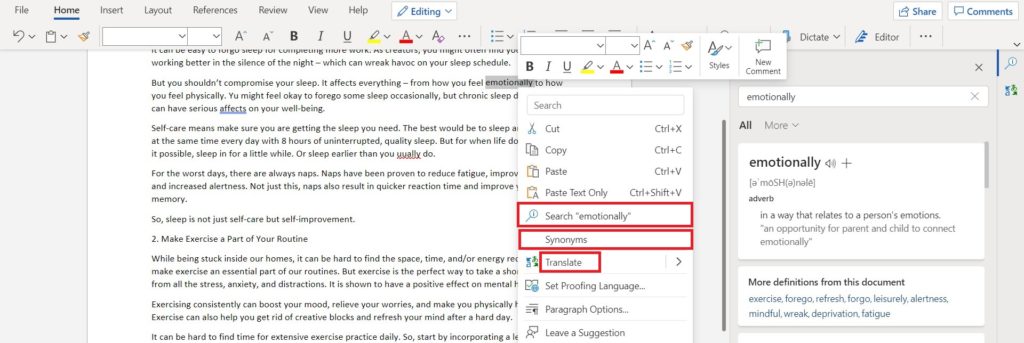
The premium version also checks for your writing style, gives you in-depth writing insights, and offers premium suggestions to improve your writing. The editor score in the free version broadly highlights only the spelling and grammatical errors without other insights.
Microsoft Word is pretty limited in its features when compared with competitors. It misses many small errors (like spelling “You” as “Yu”) and doesn’t check your writing for clichés or repetitive phrases.
Pricing
Microsoft Word offers a free plan with limited checks on spelling and grammar. The paid version provides you with valuable writing insights personalized to your style. There are several other plans of Microsoft apart from the basic ones that you can find here.

Strengths and Weaknesses
Strengths
- Free version available
- Fit for quick spell and grammar checks
- Translator available for over 60 languages
- Premium features offer writing suggestions and insights
Weaknesses
- May miss a few small errors in the document
- Limited writing insights in the free version
- Formatting can be a hassle when you copy-paste
- Pricey plans for the premium version
7. Google Docs + Gemini: Basic Grammar, Powerful Generative AI Sidebar
Google Docs’ built-in grammar and spell checker is fine for basic writing — it auto-corrects as you type, flags obvious errors, and stays out of the way. The real 2026 story is Gemini in the sidebar, which can draft, summarize, refine, and brainstorm without leaving the document.
AI features (2026 update)
Gemini inside Google Workspace (available on Business Standard and higher, or via the Gemini Advanced add-on) can write a first draft from a prompt, suggest rewrites, summarize selected text, and generate images. For grammar specifically, Gemini isn’t as precise as Grammarly, but for “help me rewrite this paragraph more clearly,” it’s right there. If you already live in Google Docs, you don’t need a separate grammar tool for casual writing.
Availability
You can simply log in to your Google account from a browser and go to docs.google.com. There is also a mobile application available on Android and iOS.
Key features
Google Documents is a basic editor to check for missed spellings, punctuation, and grammar errors. It doesn’t live up to the market competitors to check for clichés, writing style, and premium suggestions. Though, if you want just quickly proofread your document, Google Documents is pretty great.
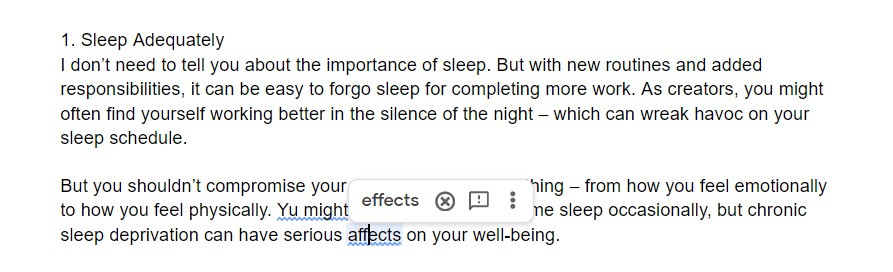
The best feature that I find in Google Documents is that it automatically corrects your little errors on-the-go. So, you don’t have to wait for it to underline your text and then click on it, check the mistake, correct the error, etc.
Pricing
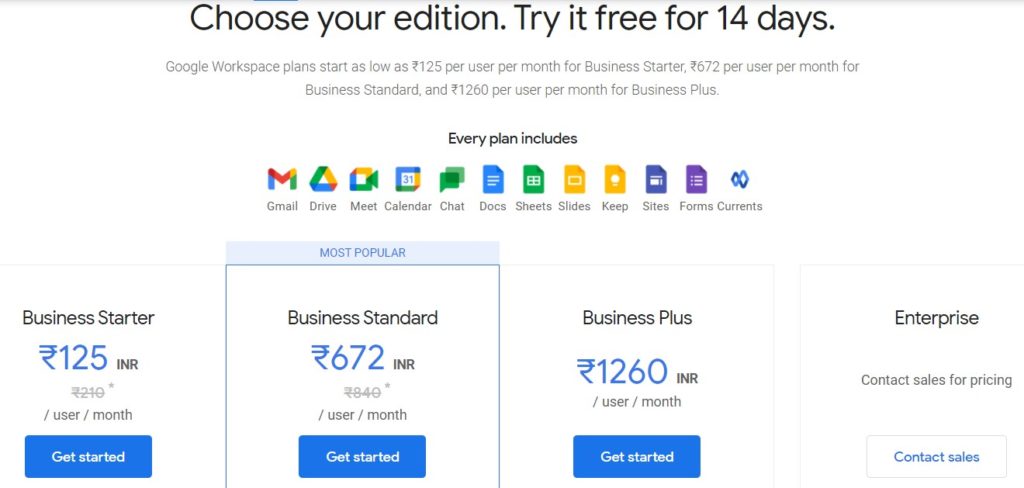
Google Documents is free , and all the grammar features work in it perfectly. But there are G-Suite Premium plans that you can look into for extra storage. You can also take a free trial for 14 days.
Strengths and Weaknesses
Strengths
- Reads into the tiniest of errors
- Corrects your writing on-the-go as you type
Weaknesses
- No writing style suggestions available
- No personalized writing style enhancements available
8. Hemingway Editor Plus: Readability Scoring + One-Click AI Rewrite
Hemingway is still the best tool for one thing: tightening prose. It color-codes hard-to-read sentences, passive voice, and weak adverbs. The free web editor remains free, but in 2023 they launched Hemingway Editor Plus, which adds AI-powered sentence rewrites at a click.
AI features (2026 update)
Hemingway Editor Plus ($10/month or $100/year) lets you highlight a flagged sentence and hit “Fix” — it rewrites for clarity while keeping the meaning. It’s focused specifically on readability, not generative writing, which I actually appreciate. You’re not getting a general-purpose AI assistant. You’re getting a targeted “make this sentence less bad” button. Based on the Hemingway App website, the desktop app is still a one-time $19.99 purchase separate from Plus.
Availability
Hemingway is available as a desktop app, but its website is also fully functional for use. They also have mobile applications on Android and iOS.
Key features
It highlights your text in multiple color-coded formats with red being hard to read, green being the use of passive voice and blue for poor adverbs. It also highlights how many words are in your document, what is their readability, etc.
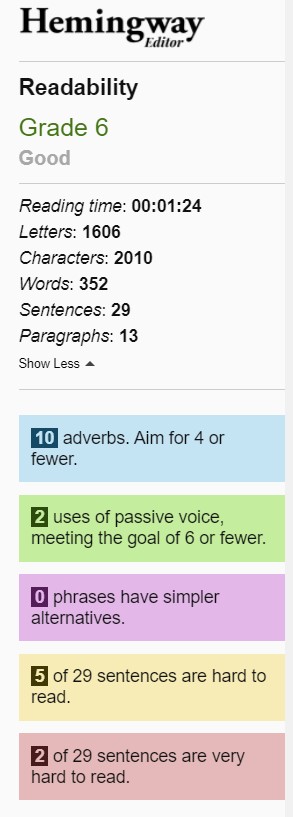
You can also switch between ‘writing’ and ‘editing’ to be undistracted by the software’s suggestions.
However, Hemingway does not provide contextual suggestions, synonyms, or dictionary features available in other software on this list.
Pricing
Hemingway’s web-based editor is free, and the desktop app is downloadable for $19.99.
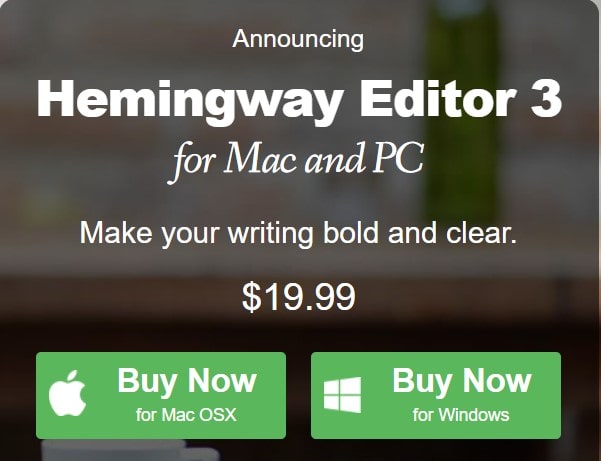
The application does not offer any new features but is less distracting to work on than a browser.
Strengths and Weaknesses
Strengths
- Enhances readability of your writing
- Checks for passive voice, hard to read sentences, etc.
- ‘Writing’ mode makes it a viable writing software as well.
- Free web browser version available
Weaknesses
- Insufficient grammar checker tool
- Not enough features like synonyms, dictionary etc. compared to its competitors
- Pricey app with no extra features
9. SpellCheckPlus: Budget Pick For ESL Learners, No AI Features Yet
SpellCheckPlus is still around and still targets a specific audience: ESL learners who want grammar scoring and tutorials on a tight budget. The interface looks dated (that hasn’t changed) and there are no generative AI features — it’s a rule-based checker that does what it’s always done.
AI features
None currently. Based on the SpellCheckPlus website, the roadmap mentions AI integration but nothing shipped as of April 2026. If you want AI rephrase or draft generation, skip this tool. If you want a cheap, reliable spelling and grammar checker with built-in learning exercises, it still works.
Availability
SpellCheckPlus is available in all browsers. You can simply go to their website and copy-paste your text. There is also a Pro version available in the browsers. There are also mobile applications available on both Android and iOS.
Key Features
SpellCheckPlus is quite different in its basic features compared to its competitors. While the suggestions are pretty much the same, the aesthetic and build of the website seem vintage. The speed and accuracy of the software was commendable throughout the editing process.
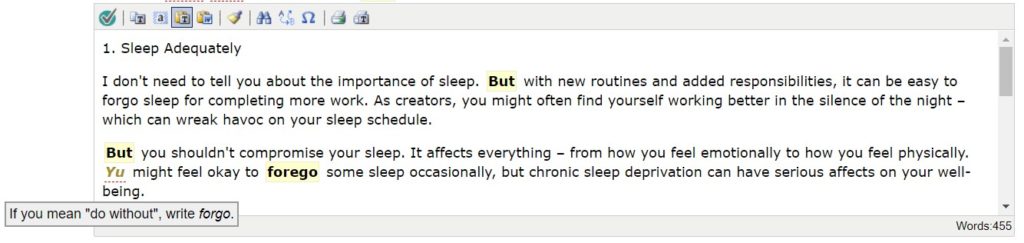
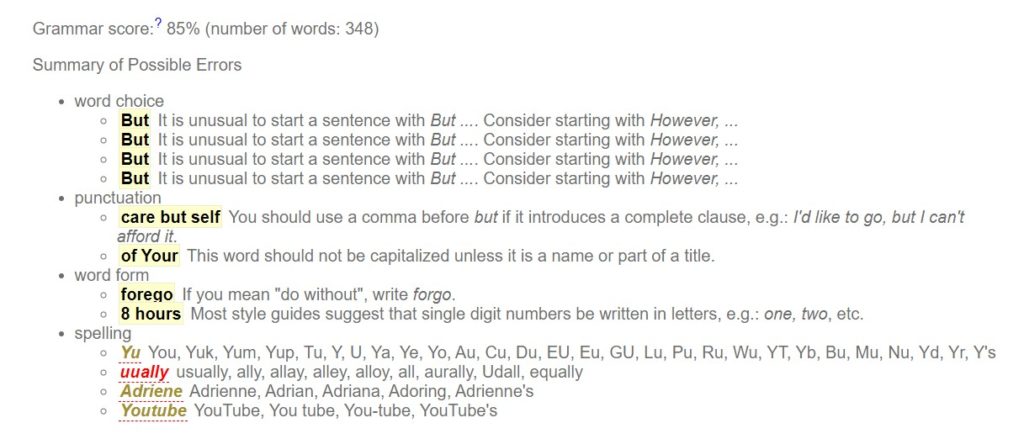
It also has a feature of giving you a grammar score and a breakdown of all the mistakes and corrections. This can be particularly useful for non-native speakers to recognize common errors.
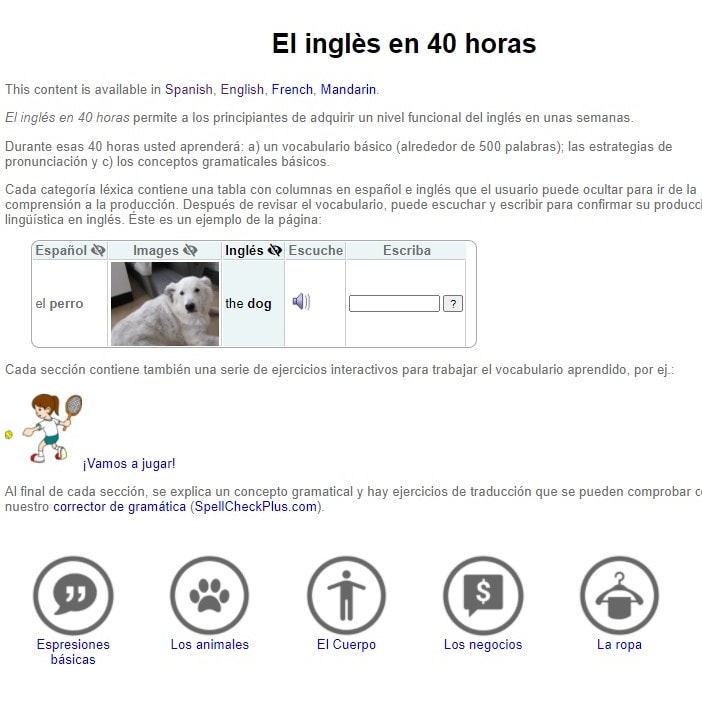
SpellCheckPlus vocabulary provides learning tutorials on their website. Linguistic principles and basic building blocks of a new language are available in this feature.
SpellCheckPlus does not offer any personalized writing style suggestions, a dictionary or a repository of synonyms. The grammar suggestions can often be repetitive (don’t start a sentence with ‘but’) and there’s no place to mark exceptions to the rule even if you want it.
Pricing
SpellCheckPlus is a free tool to use on their website with a limit of 2000 characters at a time. There is a Pro version available at $14.99/year with logged texts, a full-screen editor, no ads, and grammar exercises. Pricing plans for shared licenses, permits for schools or academicians are also available at custom pricing.
Strengths and Weaknesses
Strengths
- Free version available
- Pro-version affordable for new writers
- Language tutorials available
- Beginner-friendly
Weaknesses
- Personal Dictionary not available
- Repetitive errors highlighted - no feature to mark certain cases as exceptions
- No synonyms feature or dictionary feature
- Works only as a website on the desktop
10. PaperRater: Student-Focused, Now Bundles AI Detection Alongside Grammar
PaperRater targets high school and college students checking assignments. In 2024 they added an AI content detector to the suite — given the academic audience, that’s a logical fit. The grammar checker itself hasn’t changed much.
AI features (2026 update)
The AI detection feature flags likely AI-generated text, which is what most students and teachers using this tool actually want now. The grammar engine still misses contextual errors (based on PaperRater’s own documentation, it runs rule-based checks, not ML-based contextual analysis). For content marketers, this isn’t the tool. For students writing papers, the AI detector plus grammar check bundle is reasonable.
Availability
PaperRater is only available as a web-based application on their website.
Key Features
You can go to PaperRater’s website and paste your writing where you are required to select a type of writing and the education level of those who will be reading your writing. This feature can be useful for writing informational articles, particularly to a specific educational demographic. But there is no “blog” or “article” option available as a type of writing. The options are mostly student-oriented.
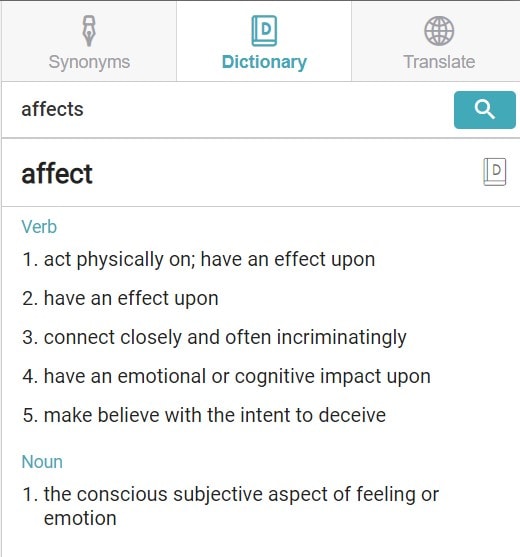
The grammar-checker does not take into account the context of the writing. While all of the spelling errors and basic grammar errors will be highlighted, a few contextual mistakes might get missed by PaperRater. For example, here, ‘affect’ was not highlighted and overlooked when it should’ve been ‘effect’.
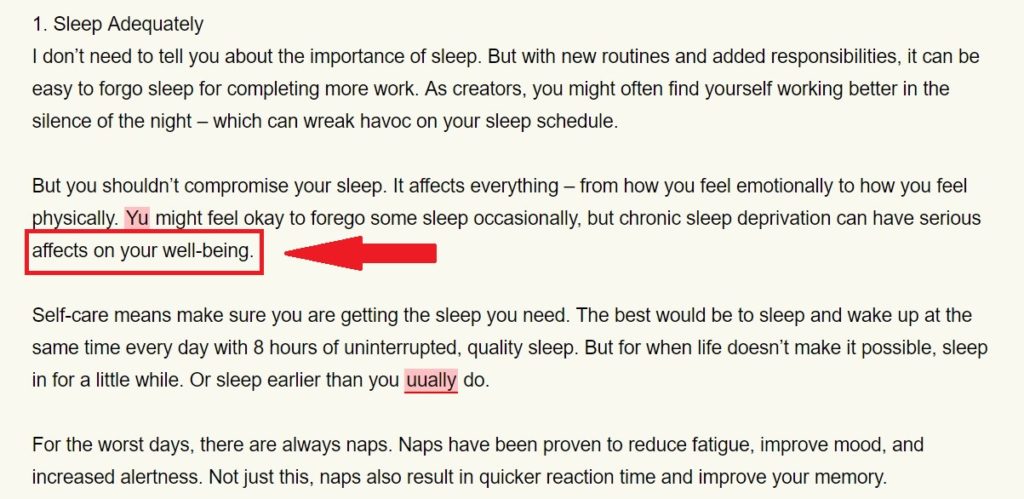
There are also styling suggestions examining your transition words, readability, sentence length, sentence beginnings, passive voice, etc. You can also get a quick snippet of the analysis of your word choices and vocabulary.
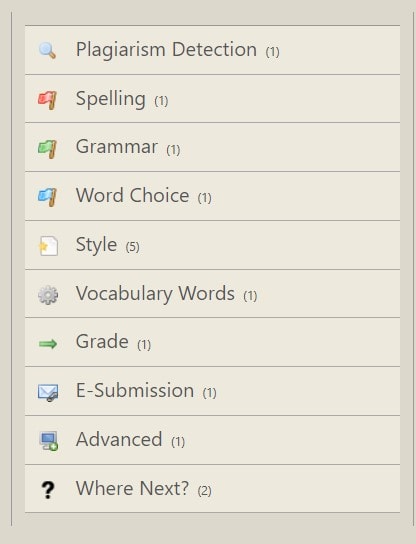
There is a printable report available of all the analysis too. There is also a plagiarism detector, although it is a little slow. The software lacks the feature of a dictionary or synonym finder.
Pricing
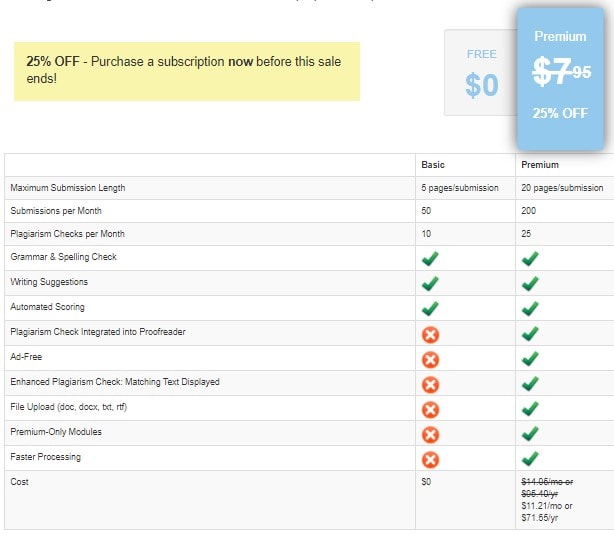
PaperRater has a premium version available that offers more plagiarism checks per month, premium modules, faster processing, advanced plagiarism checks, etc.
Strengths and Weaknesses
Strengths
- Free version available
- Plagiarism checker available
- Personalized styling suggestions
Weaknesses
- May miss certain contextual mistakes
- Mostly suitable only for students
- No dictionary or synonym feature available
- No desktop or mobile app available
After you are done choosing the right grammar checking software for you, see how you can utilize it better, and use its extra features to your advantage.
How To Use A Grammar Checker To Improve Your Writing Quality
Anyone who communicates through the medium of writing needs a grammar checker. With the advent of email, that’s almost all of us. But don’t limit your writing to being grammatically correct —enhance its readability and improve your writing style.
Here are some tips to enhance your writing quality through grammar checking software:
- Analyse Your Writing Patterns: Almost all the tools in this list offer a writing analysis of your text. Whichever one you choose, try and identify the writing patterns that you are faulty to improve them. This is especially useful for fiction authors. ProWritingAid offers you the most in-depth writing analysis, while Grammarly ensures a digestible amount of information that you can act on for improving your writing.
- Improve Readability of Your Writing: Good writing is not just grammatically correct but easy to grasp and understand. Even if you are not in a job where writing is , simple enhancements in your readability can make better emails and thus, more satisfied clients. I speak from experience when I say that all customers appreciate emails that are a breeze to read. Hemingway would be the best readability enhancing software in this list.
- Enhance Your Vocabulary: You might use certain words that can become a replacement in order to not sound too repetitive. Utilize the synonyms feature available in most of the softwares provided here and enhance the word choices you make.
- Utilise Writing Tutorials: The repository of grammar and style enhancements articles in these software(s) can improve your writing skills. Especially if English is your second language, use this knowledge to your advantage. WhiteSmoke and ProWritingAid have some of the most straightforward and most accessible writing repositories.
Frequently Asked Questions About Best Grammar Checker
What is grammar checker software?
A grammar checker software checks and highlights grammatical mistakes in your writing. It uses several rules to detect errors like agreement in tense, spelling mistakes, punctuation, etc.
Who needs a spelling or grammar checker?
Anyone who writes frequently or occasionally in their jobs should use a spelling and grammar checker. It helps you highlight common errors and fix them faster. It is best to hire a proofreader for longer articles.
What is the best free grammar checker?
Grammarly remains one of the most popular grammar checking software in the market. Its free version enables you to check your writing for grammatical mistakes and spelling errors. Good alternatives to Grammarly are ProWritingAid and Whitesmoke.
Can grammar checkers work offline?
Most grammar checker software(s) require an internet connection to check your text for common grammatical errors. However, the app version of Hemingway software works offline too.
Is a grammar checker safe to use?
Broadly, yes. A grammar checker does not monitor your content. Most software(s) don’t even auto-save your writing. However, it is best to read the Privacy Policy of the software you are using. This is especially important if you are writing something commercially or legally sensitive.
Final Thoughts: Which Grammar Checker Actually Fits Your Workflow in 2026
The AI features changed the calculus. A grammar checker without AI rephrase or tone controls in 2026 is a budget pick, not a serious one. Here’s how I’d actually recommend choosing:
- Grammarly — default pick for most content marketers. If you write daily for work and want one tool, get Pro.
- ProWritingAid — better than Grammarly for fiction, long-form, and technical writing. Reports are deeper, rephrase preserves voice more.
- LanguageTool — best value for money, best multi-language support. Good enough AI rephrase at a third of Grammarly’s price.
- Hemingway Editor Plus — use alongside another tool, not instead of. Targeted at readability only.
- Microsoft Word + Copilot / Google Docs + Gemini — if you already pay for the ecosystem, you may not need a separate grammar tool for casual writing.
- WhiteSmoke, Ginger, SpellCheckPlus, PaperRater — specific niches (ESL, students, budget). Skip if your main need is professional content work.
Sure, stacking two tools sounds like overkill. But if you write for a living, running a draft through Grammarly for correctness and then Hemingway for readability takes two minutes and catches issues neither tool would catch alone. That’s the workflow I actually use, and it’s worth the $12 and $10 a month combined.