Plagiarism checkers used to catch cut-and-paste. Now the harder question is whether the words were written by a human at all.
Best AI Content Detectors 2026 (Plagiarism + AI-Generated Text Checkers)
Since ChatGPT hit in late 2022, every content team I know has been scrambling for tools that flag AI-generated text, not just copied text. The best checkers in 2026 do both, and the older plagiarism-only tools are slowly getting left behind.
I’ve been running Grammarly Premium since 2018, and its AI detector is now where I start for most editorial work. But the category has grown fast. Originality.ai is the accuracy benchmark for content marketers, Copyleaks handles enterprise scale, and GPTZero is the one schools trust. Below are nine tools worth knowing, what each one actually catches, where each falls short, and what the 2026 pricing looks like.
Methodology
I ran each tool through the same 250-word test passage: roughly 89% lifted from two public marketing-strategy articles, with one original sentence dropped in the middle. For tools that ship AI-content detection, I also ran a separate AI-written passage to benchmark false-positive and true-positive rates. Plagiarism results from the shared test:
[table id=84 /]
Grammarly
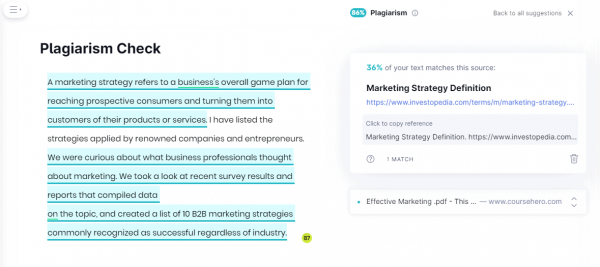
Grammarly’s AI-content detector launched in 2023 and has been getting smarter since. It sits inside the same editor I use for drafts, so flagging AI-generated passages doesn’t require bouncing between tools. The plagiarism checker still works too. It scans the open web plus ProQuest’s academic database and shows matching sources alongside a percentage score.
I’ve been paying for Grammarly Premium since 2018. The AI detector isn’t the most aggressive on the market (Originality.ai catches more), but the trade-off is fewer false positives when your prose has been heavily edited. For editorial teams reviewing hybrid human+AI drafts, that matters more than raw catch rate.
What it does in 2026:
- Detects AI-generated text with a percentage score and highlighted passages.
- Checks plagiarism against the open web and ProQuest’s academic index.
- Flags grammar, tone, clarity, and passive voice in real time.
- Works inside Google Docs, the browser, desktop apps, and mobile keyboards.
- Suggests rewrites for flagged AI-generated passages.
Where it falls short: the AI detector runs only inside the Grammarly editor. No bulk DOCX or PDF upload. And the plagiarism tool still misses tightly paraphrased lifts that Originality.ai catches. Full writeup in my Grammarly review.
Pricing (April 2026): Premium is $12/month billed annually, $30/month billed monthly, or $60/quarter. Plagiarism and AI detection require the Premium tier.
Strengths and Weaknesses
Strengths
- It correctly identified 86% plagiarism and provided exact matching sources of the text.
- It highlighted the duplicate content.
- Gives plagiarism score and percentage
Weaknesses
- It is relatively expensive compared to other plagiarism checkers.
- It does not provide an in-depth report unlike some of its competitors.
- You have to make a user account to use Grammarly.
QueText
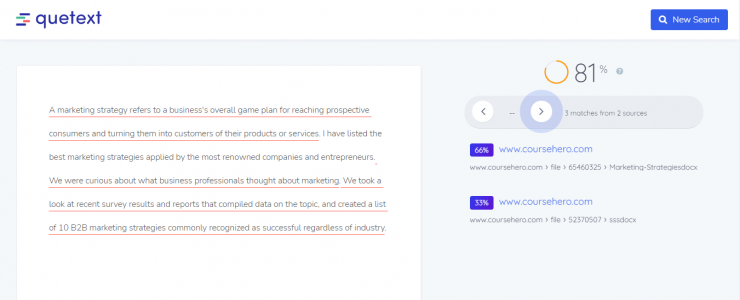
QueText rolled out AI-content detection in 2024 alongside its long-running plagiarism engine. The free tier still handles a 500-word plagiarism check, and the Pro tier bundles AI detection with DeepSearch, a stronger crawl that reaches paywalled academic sources. Based on G2 reviews, it lands in the middle of the pack for AI-detection accuracy. Good enough for classroom use, not where I’d go for editorial gatekeeping on commercial copy.
Top Features:
- Detects AI-generated text (added in 2024) with a confidence score.
- Color-codes passages and shows match sources inline.
- Scans web, news, online textbooks, and academic databases.
- Includes an APA/MLA citation assistant.
- Offers an API for higher-volume teams.
Where it falls short: the free tier caps at 500 words, and the AI detector leans cautious. It’s slower to flag short bursts of AI text that Originality.ai catches on the first pass.
Pricing (April 2026): Free for 500-word plagiarism checks. Pro starts at $9.99/month for 100,000 words and bundles AI detection.
Strengths and Weaknesses
Strengths
- It accurately detects plagiarism within seconds.
- It is free of use.
- It doesn’t require sign-up or registration to use the application.
Weaknesses
- You can only copy-paste your text onto the board. It does not allow you to upload your documents and then edit them.
Paper Rater
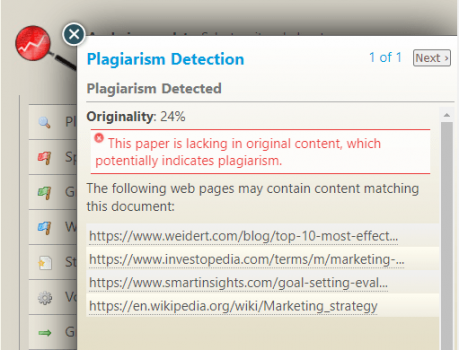
Paper Rater is an old-school academic tool. It still does plagiarism checking, grammar, and style feedback, but has not shipped a real AI-content detector as of April 2026. The interface looks straight out of 2015. That said, the writing-quality feedback is genuinely useful for student essays because it’s calibrated by grade level.
For content marketers evaluating AI-written drafts, Paper Rater is the wrong tool. It’ll tell you your grammar is off, not that your words were generated by GPT-4o.
Top Features:
- Plagiarism detection against online sources.
- Grammar, spelling, punctuation, and style grading.
- Writing-quality scoring calibrated by grade level and paper type.
- Vocabulary and word-choice suggestions.
- Developed by linguists and subject-matter experts.
Where it falls short: no AI-content detection, no bulk file upload on the free tier, and the UI has not been meaningfully updated in years.
Pricing (April 2026):
- Free tier with daily word limits.
- Premium is $14.95/month or $71.95/year.
Strengths and Weaknesses
Strengths
- It accurately detects the plagiarised content.
- It provides links to the original sources with the nearest possible match.
- It gives your text an originality score.
Weaknesses
- It doesn’t save the writing reports the software generates.
DupliChecker
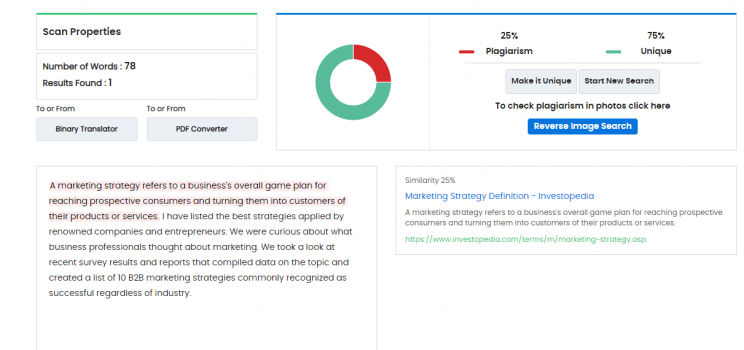
DupliChecker now ships a standalone AI-content detector alongside its free plagiarism checker, both capped at 1,000 words on the free tier. Based on user reviews across G2 and Trustpilot, accuracy for both detectors is middle-of-the-road. It catches obvious lifts and obvious AI prose, but misses paraphrased or edited variants that Originality.ai routinely flags.
Reasonable first-pass scanner for students or hobby bloggers who can’t justify a paid tool. For commercial publishing, it’s not enough.
Top Features:
- Free plagiarism check up to 1,000 words per scan.
- Separate AI-content detector (free tier, same word cap).
- File uploads in .tex, .txt, .doc, .docx, .odt, .pdf, and .rtf.
- URL-based web-page plagiarism checks.
- Bundles 50+ other free SEO and writing utilities.
Where it falls short: the free AI detector posts high false-positive rates on heavily edited prose. The paid tier starts at $10/month, which buys you more scans but not materially better accuracy.
Pricing (April 2026):
- Free tier with 1,000-word cap.
- Paid plans start at $10/month for 10,000-word searches.
Strengths and Weaknesses
Strengths
- It detects direct plagiarism from the text.
- Can upload documents in various formats.
- Easy to use and integrate with other free tools.
Weaknesses
- It couldn’t detect patchwork plagiarism.
- The free version has limitations on the number of words that can run through the software.
Plagium
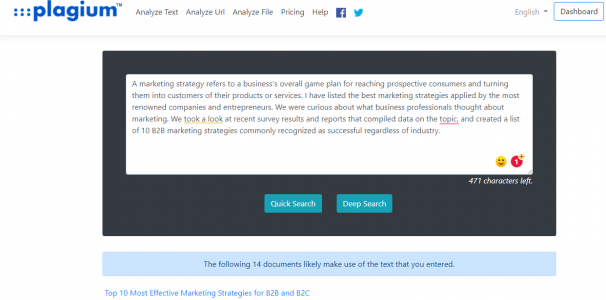
Plagium hasn’t shipped AI-content detection yet as of April 2026. What it does offer is a plagiarism search with Quick and Deep modes, returning a ranked list of matching URLs rather than a single score. For investigative work (tracking down where your own published writing is being scraped), it’s a useful second opinion.
For a content marketer checking drafts before publication, Plagium is thin. You need an AI detector alongside, and that’s not in the box.
Top Features:
- Quick and Deep plagiarism modes.
- Lists all matching URLs ranked by similarity.
- Accepts pasted text, uploaded files, or a URL.
- Includes document-comparison mode.
- Free quota of 1,000 characters per check.
Where it falls short: no AI-content detection, no percentage score, and the 1,000-character free quota is tight for real editorial work.
Pricing (April 2026): Free tier with character limits. Paid credits start at roughly $4.99 for 10,000 characters.
Strengths and Weaknesses
Strengths
- The Deep Search feature gives an in-depth analysis of the plagiarized content.
- It is inexpensive
- It has a Google Documents add-on.
Weaknesses
- It does not give a plagiarism score, unlike many software.
- You have to register and have a paid plan to upload documents and get a word-usage report.
- If you are a frequent user of Plagium, then the software will urge you to buy a premium plan.
Plagiarism Checker
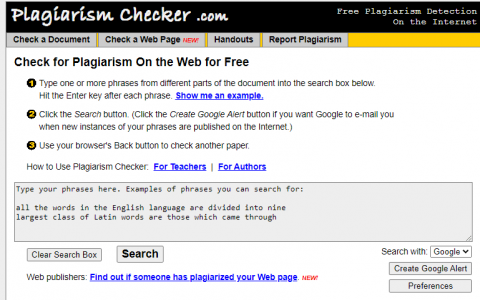
Plagiarismchecker.com is essentially a wrapper around Google search, built for teachers and authors who want a quick verification loop. It hasn’t added AI-content detection and, based on public site activity, has not meaningfully updated since 2021. Useful if you want a Google Alert setup for scraped content. Not useful for editorial gatekeeping on new drafts.
Top Features:
- Runs plagiarism checks through Google and Yahoo search APIs.
- Sets up Google Alerts for new matches of your content.
- Free to use with an internet connection.
- Lets you report sites that plagiarized your work.
Where it falls short: no AI detection, no native matching engine of its own, no paid upgrade path. It’s a legacy tool. Fine as a backup, not a primary check.
Strengths and Weaknesses
Strengths
- It is free of cost and easy to use.
- You can use the checker to check for online plagiarism as well.
Weaknesses
- It only works on Google Chrome and Yahoo! browsers.
- It doesn’t highlight any text.
- It has a word limit of 34 words. You can paste different phrases from your text.
Pricing (April 2026): Free with an internet connection.
Plagiarisma
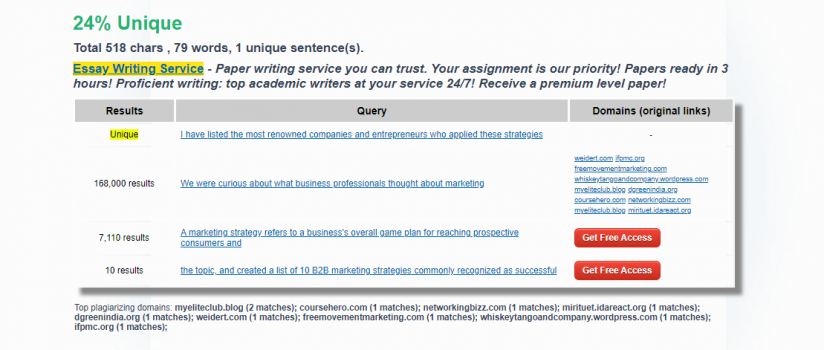
Plagiarisma’s angle is languages. It runs plagiarism checks across 190+ of them, which is rare in this category. But like Plagium, it has not added AI-content detection. The interface is dated, the free word cap is tight, and the Premium tier is cheap but doesn’t add AI catch.
For multilingual editorial teams checking non-English drafts, Plagiarisma is one of the few remaining options. For English AI-written copy, skip it.
Top Features:
- Plagiarism checks in 190+ languages.
- Accepts pasted text, uploaded files, or a URL.
- Supports TXT, HTML, RTF, DOC, DOCX, PPTX, XLSX, XLS, PDF, ODT, EPUB, FB2.
- Firefox and Chrome extensions.
- API access for integrations.
Where it falls short: no AI-content detection, free tier heavily limits search count, and the UI looks frozen in the 2010s.
Strengths and Weaknesses
Strengths
- This plagiarism checker is useful for students, teachers, and writers from all industries.
- It accurately identified the unique content and provided links to the sources of the plagiarised text.
- It checks texts in 190+ languages and gives the word and character count as well.
Weaknesses
- It doesn’t save text files or reports.
Pricing (April 2026): Free with limits. Premium from $5/month.
PlagScan
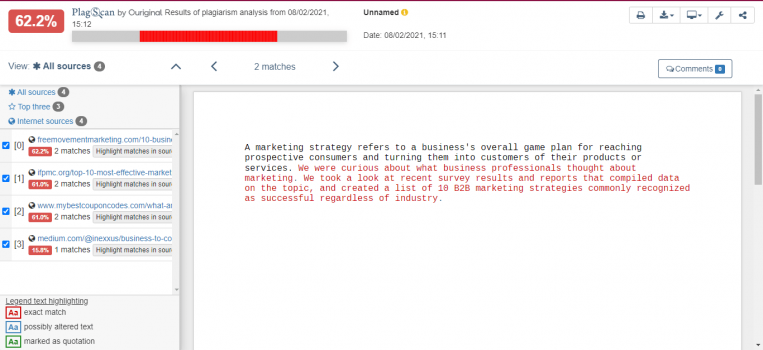
PlagScan is now part of Turnitin. It was acquired back in 2021 and the consumer tier has been folded into Turnitin’s enterprise stack. If you’re an educational institution, it’s likely what you’re already using, and the AI-detection module Turnitin added in 2023 is bundled in. Individual content marketers can’t really buy it anymore.
Top Features:
- Turnitin’s AI-content detector bundled in.
- Plagiarism scanning against web, academic, and internal repositories.
- LMS integrations (Canvas, Moodle, Blackboard).
- Cloud storage upload (Dropbox, Google Drive, OneDrive).
- Team comments, version control, and API access.
- Color-coded match highlighting to original sources.
Where it falls short: no public pricing, sales-led procurement, and individual or small-team purchases aren’t supported. If you’re not an institution, Copyleaks or Originality.ai is the better fit.
Strengths and Weaknesses
Strengths
- It highlights and scores plagiarized content.
- You can integrate Plagscan into various Content and Learning Management Systems.
Weaknesses
- It isn’t fully accurate and doesn’t pick up every plagiarised content.
- Cluttered interface.
- You have to sign-in/register to run the check.
Pricing (April 2026): Institutional pricing via Turnitin sales. Legacy individual pay-per-page plans have been phased out.
Bonus: The AI-Native Detectors Worth Adding
The tools above were built for plagiarism first and bolted AI detection on later. These three were built for AI detection from day one and belong in any 2026 workflow.
Originality.ai is the one I’d pick for commercial content publishing. It combines AI detection, plagiarism checking, fact-checking, and readability in a single scan. Accuracy on recent GPT-4o and Claude outputs is the best I’ve seen cited in independent benchmarks. Pricing is credit-based: $12.95/month gets you 2,000 credits, and one credit covers 100 words of scanning. It’s what I’d hand a freelance editor who needs to verify human authorship before a post ships. Full breakdown: Originality.ai review. Where it falls short: the AI detector occasionally flags heavily edited human prose, so treat scores between 15-40% as “needs human review” rather than a verdict.
GPTZero is the detector most schools and universities rely on. It runs free for short text (up to 5,000 characters per scan) and paid tiers start at $10.99/month for 150,000 words. The interface is simpler than Originality’s, and the sentence-level AI-highlight view is the best pedagogical display I’ve seen. Useful if you’re explaining to a writer why a passage reads as machine-generated. Full breakdown: GPTZero review. Where it falls short: less accurate than Originality on paraphrased AI text and on newer models, so it’s a second-opinion tool for commercial work rather than a primary gatekeeper.
Copyleaks is the enterprise pick. It handles API-volume scanning (millions of documents per month) and combines AI detection with plagiarism and paraphrasing detection in one pipeline. Pricing starts at $7.99/month for individuals but scales quickly into API and enterprise tiers. For a publication running dozens of writers or an ed-tech product that needs detection at scale, Copyleaks’ API is probably what you want. Full breakdown: Copyleaks review. Where it falls short: the individual UI is functional but not polished, and the per-credit pricing gets expensive fast once you exceed the starter tier.
Bonus: Perform A Google Search
If you don’t want to use any software, you can always run a quick Google search to check for obvious plagiarism. Paste a 10-15 word string in quotes into Google and see whether an exact-match source comes up. It’s the cheapest first-pass check for a single suspect passage.
The limits: Google can’t check entire documents, won’t tell you which specific sentence was lifted, and can’t detect AI-generated text at all. Fine as a spot check. Not a replacement for the tools above.
Frequently Asked Questions About AI Content Detectors
Let me address the common questions teams ask when they shop for a detector.
How does an AI content detector work?
AI detectors analyze text for statistical patterns that machine-generated writing tends to exhibit: unusually even sentence structure, low burstiness, predictable word choices, and semantic consistency. They return a probability or percentage score estimating how much of the text was AI-written. Accuracy varies by tool and by the LLM used to generate the text.
Are AI content detectors reliable in 2026?
The best ones (Originality.ai, Copyleaks, GPTZero) hit 95%+ accuracy on unedited GPT-4o and Claude outputs in independent benchmarks. Accuracy drops fast when the AI text has been edited or paraphrased by a human. No detector is 100% reliable. Treat the output as a signal, not a verdict.
Can AI detectors catch Claude and GPT-4o writing?
The top detectors can catch unedited output from both models with reasonable accuracy. Once a human edits the draft meaningfully (rearranging sentences, adding specifics, swapping phrasing), catch rates fall. This is why editorial teams use detectors as one signal among many, not as the final arbiter.
What is the best free AI content detector?
GPTZero’s free tier is the strongest, with QueText’s free AI check as a backup. For serious commercial work, the paid tiers of Originality.ai or Copyleaks are worth the $10-13/month.
Does Grammarly detect AI content?
Yes. Grammarly’s AI-content detector launched in 2023 and is bundled with Premium. It works only inside the Grammarly editor and doesn’t support bulk file uploads, but accuracy on unedited AI text is solid. For content teams already on Grammarly, it’s the easiest starting point.
What percentage of AI content is acceptable?
It depends on your editorial policy. Google’s guidance is about helpful content regardless of source, so the real question is whether the text adds value. Most publications I know cap AI-generated percentages at 20-30% for editorial posts. The rest needs human expertise, examples, or original analysis.
What plagiarism checkers do universities use?
Universities mostly use Turnitin (which includes the former PlagScan), Grammarly, and GPTZero for AI detection. Some large institutions layer Copyleaks for API-scale scanning across LMS submissions.
Final Thoughts
If your main job is catching plagiarism, Grammarly Premium handles most cases and you probably already pay for it. If your main job is catching AI-generated text for commercial publishing, Originality.ai is the one to beat. For schools and universities, GPTZero is the category standard. For enterprise API-scale work, Copyleaks.
The older plagiarism-only tools (Paper Rater, Plagium, Plagiarisma, Plagiarismchecker.com) still work for their original purpose, but they’re thin for 2026 editorial workflows where AI drafts are half the pipeline. Use them as second-opinion scanners, not primary gatekeepers.
Pick one AI-native detector for the first pass, pair it with one plagiarism tool for source matching (Grammarly or QueText covers it), and move on. Let me know which combination is working for your team.

Written by
Ayushi Khandelwal
A former software product review writer at Elite Content Marketer, Ayushi loved learning and sharing new avenues to help creators. Besides, she’s a trained classical dancer, a sucker for R&B music, and a baker. Kafka has her heart and Søren, her mind.
View Profile →Related Articles
AI Tools & Software
Teachable Vs. Thinkific: Exhaustive Comparison
Thinkific and Teachable are consistently ranked among the best online course platforms on the first and second spots. But which one of them is better suited for your online education business requirements without breaking the bank? Let’s break down Teachable vs. Thinkific course platforms. Note: This article contains affiliate links. ... Read more
Apr 8, 2026Read more →
AI Tools & Software
Kajabi Vs. Teachable: Which Is The Better Course Platform
Kajabi and Teachable are popular online course platforms. Both have their share of pros and cons — but which one’s the best suited for your needs? Let’s break down the Kajabi vs Teachable debate in this article. Overall, I’d recommend going for Kajabi if you’re a pro-creator and need a ... Read more
Apr 8, 2026Read more →
AI Tools & Software
Best Creator Tools to Build, Monetize, and Profit
Here is our curated list of top tools you can consider as a content creator. I’ve divided them across categories for different use cases. Note: Some of these use affiliate links, so if you buy through our link, we may make a commission (at no cost to you). Thanks for ... Read more
Apr 8, 2026Read more →