This article contains affiliate links. If you sign up using my link, I earn a commission at no extra cost to you.
How to Get More Views on YouTube for Free (2026): 21 Tactics

YouTube in 2026 looks like this: 1/ non-subscribers see new videos even in the first hour 2/ most recommendations are pulled for each viewer when they open the app 3/ Shorts work, use them with intent. Here’s how to get more views on YouTube, in 21 tactics.
1. Pick topics people already search for
Search your topic on YouTube, filter out Shorts, and sort by view count. YouTube strategist Paddy Galloway does exactly this (2024). Then check the topic in Google Trends set to YouTube Search, and open Audience, then What your audience watches, in Studio. Shortlist ideas that already pull views.
George Alexander gained 11 subscribers in six weeks (2025). Then he posted a video on a topic people wanted, and “the views just immediately shot up to, you know, about 6,000 views a day.” Eight days later he had 1,000 subscribers.
vidIQ describes the same pattern (2026) with a hypothetical channel: four videos at about 100 views, then a fifth at 10,000.
Todd Beaupré, YouTube’s Senior Director of Growth & Discovery, points creators to Google Trends (2025) to see “how often people are searching on YouTube for particular topics”.
For search volume estimates, TubeBuddy‘s keyword explorer and vidIQ both help. TubeBuddy has a free trial.
2. Make more videos than feels comfortable
Plan for 100 videos, not 10. Improve one thing per video and write down what it was. Don’t judge your channel on its first handful of uploads.
MrBeast started in February 2012. His breakout, I Counted To 100,000!, came in January 2017, about 4.9 years later. Two years in (2014), he said: “I’ve actually uploaded like over 300 videos to this channel but a lot of my older videos sucked”. His advice on X (2020): “make 100 videos and improve something small with each video. Doesn’t matter what, just improve each vid.”
Here’s how long other creators took:
| Creator | Started | Uploads before first traction | Time |
|---|---|---|---|
| MrBeast | 2012 | 455+ public uploads before his first viral hit (Jan 2017) | ~4.9 years |
| Marques Brownlee | 2008 | ~594 before his Nov 2013 viral video (74 subscribers at video 100, Feb 2009) | ~5.7 years |
| Casey Neistat | 2010 | 255 before 1M subscribers (Aug 2015), about 158 of them in five months of daily vlogs | ~5.5 years |
| Ali Abdaal | 2017 | 146 before 100K (Dec 2018); 299 before 1M (Nov 2020) | ~1.9 years to 100K, ~3.9 to 1M |
| Yes Theory | 2015 | 142 before 421,726 subscribers in 48 hours (Sept 2017) | ~2 years |
| Colin and Samir | 2016 (making videos since 2012) | 241 before 1M (Oct 2022) | ~6 years; they call it 10 |
| Veritasium | 2011 | 75 uploads in year one; a first spike in month 2 or 3, then “nothing happened for months” | under 1 year to a spike |
| Emma Chamberlain | 2017 (oldest public upload) | 27 uploads in about six weeks before her first hit (July 2017) | weeks |
| Peter McKinnon | 2016 | 19 before 100K (Feb 2017); 104 before 1M | ~0.2 years to 100K |
| Mark Rober | 2011 | 0; his first video got 1.5 million views in one day | 0 |
Counts are public uploads still on each channel on September 29, 2026. Deleted videos don’t show, so every count is a floor.
Peter McKinnon and Mark Rober hit fast. They’re rare. Paddy Galloway pushes back on volume (clip posted 2023): “I think it’s important you know quality over quantity”. Fair: volume only works without cutting corners. Roberto Blake claims (2024) top channels average 500 to 700 uploads, from his own analysis.
The trap is perfection. Ali Abdaal admits (2023): “I could spend a whole month working on a video instead of making I don’t know one or two videos a week”.
Rene Ritchie, YouTube’s Head of Editorial & Creator Liaison, put it best (2025): “Very few people blow up immediately. It’s very rare. So take that time and like figure out every video what I can learn from this video.”
3. Learn how YouTube recommends new channels
Make each early video about one clear topic that a specific group of viewers already watches. Judge it by how its first viewers respond, not by your subscriber count.
You don’t need an audience first. Todd Beaupré explained in September 2026: “When a new channel publishes for the first time, there are zero viewers who have that channel in their history. Does that mean that they’re not appealing to any viewer? No”. Instead, YouTube will “look at things like the user’s topical preferences and what we understand about what this video is about”.
Subscribers aren’t reach. YouTube’s FAQ says the count “doesn’t represent the number of viewers who watch your videos.”
Each video gets a fresh shot. YouTube’s recommendation system page says: “The algorithm uses fresh performance data for each individual video, rather than relying on past results”. The same page warns that repeatedly posting videos that don’t resonate can affect a channel over time. A string of flops means change topics.
4. Get more views on YouTube Shorts
Put the hook in the first frame. After posting, compare each Short’s viewed versus swiped away figure with your last 10 Shorts. Post while a topic is current.
Think Media gives a target (2025): “If you can get 70% of people to view your short instead of swipe away, so keeping that swipe away below 30% is going to be really helpful.” That’s a creator benchmark. YouTube publishes no threshold.
Todd Sherman, YouTube’s Shorts product lead, says (2024) that when a Short flops, “the percentage of people that swiped away was just like much higher.” Rene Ritchie adds (2026): “So recency weighs more for your short form video.”
How many? vidIQ’s study of 100,000 channels suggests (2026) small channels start at 25 to 35% Shorts.
Shorts run up to three minutes. Since March 31, 2025, a Short counts a view every time it starts or replays, so don’t compare Shorts views with long-form views. For hashtags, see my YouTube hashtags guide. Submagic handles captions and CapCut the edit.
5. Plan the title and thumbnail first
Before any script, put a rough title, a thumbnail sketch and a one-line pitch on one page. If the idea won’t fit, drop it and move on.
Paddy Galloway, on a drone-vs-F1 video with 20M+ views (2024): “If we had titled it something that was maybe 10 or 20% worse, the video wouldn’t have 10 or 20% less views. It might have a fraction of the views.” That’s his estimate, not a test.
Ali Abdaal works the same way (2023): “we really think about the title and thumbnail first”.
Todd Beaupré explained why (2025): a video that beats similar videos on click-through rate is “going to end up getting more Impressions because it’s going to rank higher in the feed”.
Once a video has steady views, Studio can test up to three titles or thumbnails. It isn’t a day-one tool.
For thumbnails, Canva works fine, and Placeit has ready-made YouTube templates.
6. Write titles people want to click
Name the thing viewers already wonder about. Put the key phrase first and stay under 50 characters. Episode numbers and branding go at the end.
Veritasium shared this (2021): “Here’s a video I originally titled ‘Are negative ions good for you?’ which is a question nobody asked, ever. Now I changed it to ‘Do salt lamps work? Seriously.’ And here’s the result: one and a half million more views.”
On length, MrBeast (via a Think Media compilation, 2023): “Ideally you want it below 50 characters, because above 50 characters on certain devices you run the the chance of it going dot dot dot… and that’s the worst thing”.
YouTube’s own title tips agree: “Be succinct. Viewers may only see part of your title. So aim to keep it short and put the most important words near the beginning. Save episode numbers and branding for the end.”
7. Hook viewers in the opening seconds
Make your first line confirm what the title and thumbnail promised, then raise the stakes. Check the 30-second mark on your retention graph.
MrBeast (via Think Media, 2023): “Envision a chart where you lose 35% of your viewers in the first 30 seconds, and then a vision one where you only lose 20%.” That gap can mean “hypothetically like 2 million views on a video and like 10.” His fix: “Your title and thumbnail set expectations, and at the very beginning of the video, to minimize drop off, you want to assure them that those expectations are being met.”
Colin and Samir aim for 90% still watching at 30 seconds (2024), because that means “you clicked on the thumbnail and it is the thing you wanted to watch.”
A hook you never pay off costs you. Todd Beaupré said (2026) YouTube uses viewer surveys because “We don’t want to just assume that all time is valuable”.
8. Use audience retention to fix your videos
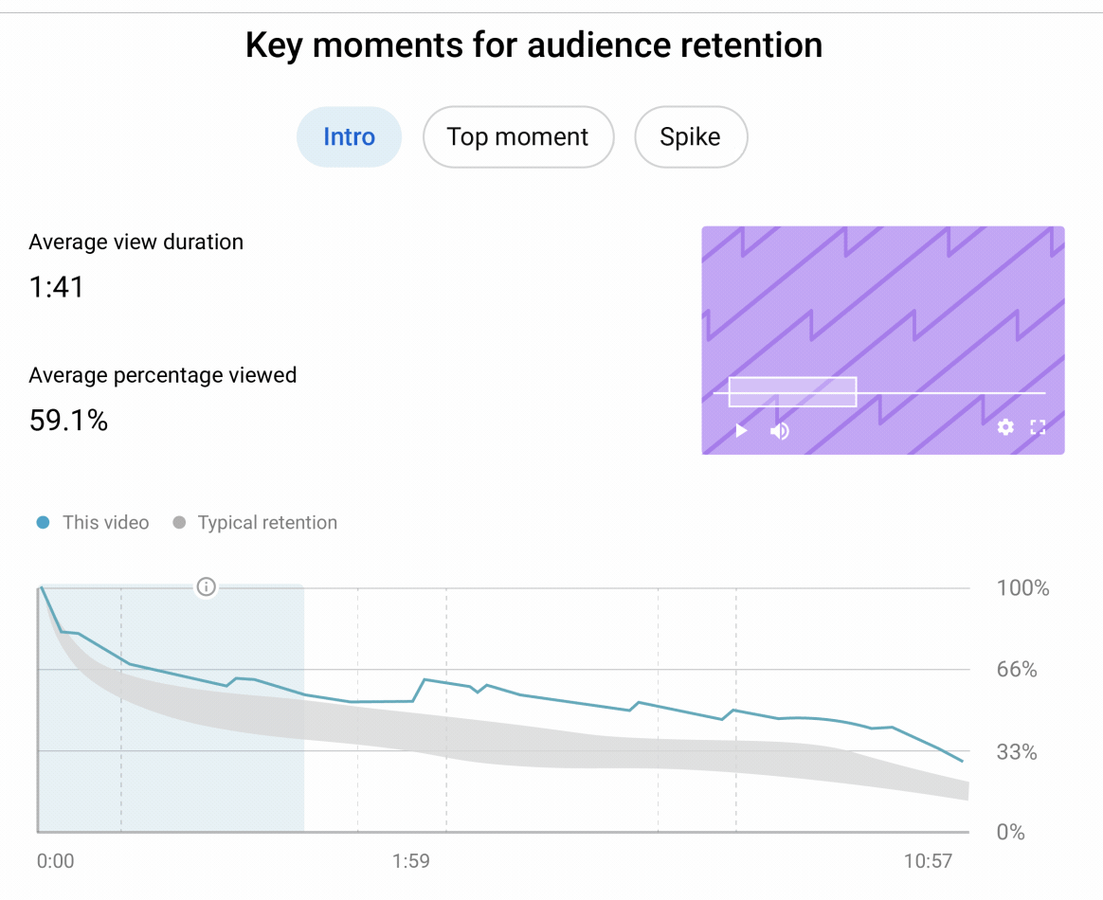
Open the retention graph on every video and compare it with your videos of similar length. Find the steepest drop and cut that kind of moment from your next edit. No ideal length exists; match what your best videos run.
Jenny Hoyos had a Short stuck at about 50K views (2023). She explains: “I pulled up the retention graph and I noticed on the last second it was a huge dip. It was 70%, 1 second later it was 45%”. She trimmed that second, and “it went from 83% to 88% and the video went flying.” She says YouTube later removed Shorts trimming, so treat this as a graph-reading lesson.
vidIQ cuts slow intros (2026). Danny Deer saw retention “jumped up by 10%” after a similar cut (2023), though he admits the boost didn’t last.
Todd Beaupré’s advice (2026): “Look at your retention graphs on your videos to see where people are relatively dropping off.”
Descript lets you cut by editing the transcript, and its free plan covers an hour of media a month. If you’d rather cut on a timeline, the Camtasia editor is free to use; exports carry a watermark until you pay. More options in my list of the best video editing software for YouTube.
9. Write descriptions and chapters for search
Put your search phrase in the first two lines of the description, written fresh for each video. Add chapters with descriptive names so Google can show them as key moments. Tags barely matter: YouTube’s own FAQ calls them “not important.”
Think Media’s Craig says (2025) “having a really rich description that has a lot of those buzz keywords, especially in the first few lines, is really important for discoverability for your videos.” One re-optimized video went from 60–70 to 180–200 views a day, though he changed the title at the same time.
After Janice Wald added chapters (2022), Google Search became almost 10% of one video’s traffic. She saw no click-through lift, though.
YouTube’s FAQ lists what search ranking looks at: “How well the title, description, and video content match the viewer’s search. What videos drive the most engagement for a search. Note: Search results are not a list of the most-viewed videos for a given search.”
10. Use Shorts to grow your long videos
Script and edit Shorts as their own videos, not auto-clips. When a Short should feed a long video, add it as the Short’s related video, say why to click, and make the long video’s first seconds pay off.
Think Media’s NBA test channel (2023) clipped two Shorts from long videos: 7,405 and 32.1K views in 28 days. Then it scripted one from scratch. The host: “Within the first hour of posting this short I got 76,000 views and today that short has brought in over 2 million views and six thousand 600 subscribers.”
Katie Steckly found (2025) that “out of over 3 million shorts views in the month of May, that generated me just over a thousand long form views.” Her best converter had “a very clear call to action.”
YouTube’s Creator Insider says (2026): “When they click on that link, you have to reward them for that click right away.”
Opus Clip finds clip candidates. Rewrite them before posting.
11. Turn your best videos into a series
Take your best-performing format and repeat it with the same framing and title pattern. Group the episodes in a playlist on your channel home. For Shorts, use Shorts series.
Jenny Hoyos did this with her $1 fast-food videos. She says (2023): “it’s actually a playlist, and I get a lot of views from people like just like watching it down, and they they just know it’s me every time they see that framing.”
Todd Beaupré explained (2026) that “viewers don’t want to be picking up the remote every 5 to 10 minutes to make a new video decision. This is why series tend to work on television”.
At Made on YouTube in September 2026, the YouTube blog announced: “With Shorts series, creators can now structure their Shorts into seasons and episodes”.
12. Use end screens to keep viewers watching
In Analytics, sort your videos by subscribers gained. Point one end-screen element at the top converter, mention it in your outro, and pin a comment linking to it.
vidIQ did this on its own channel and reports (2026) that its top converter gained about twice the subscribers of its top-viewed video on a quarter of the views. Their rule: “This is a video that goes in your end screen. This is a video you link in your newsletter.”
TubeBuddy’s Andy Davidson claims “23,000 extra views on one video, 16,000 on another” from end screens. That’s a vendor blog, self-reported and undated.
Here’s why it matters. Todd Beaupré said (2026) that “the number one place that people are watching videos from channels they’re subscribed to is actually on the watch page in that suggested list.”
13. Embed your videos in blog posts and emails
Turn blog posts that already rank into videos. Embed each video near the top of its post. Send new uploads to your email list on launch day.
If you have a blog, start here. Dann Berg shared his 2024: “I mostly just turned existing blog posts into videos and tutorials, but created a few stand alone videos, too. I started the year at 1,410 subscribers, and it grew to almost 6,400 by the end of 2024.” That came from 16 uploads.
Andy Crestodina of Orbit Media found (2020, updated 2023) that “most of the views are from that embedded player in the article.” For email, AWeber reports (2022) that after AJ Hoge started a weekly auto-newsletter, his new video passed 73K views against a 35–45K average. That’s AWeber’s case study about its own feature.
Short watch time from those visits won’t hurt you on Home. Todd Beaupré said (2026) that if embed visitors behave differently, “it doesn’t make sense for us to weight that information very much.”
14. Repurpose your videos for other platforms
Rebuild clips for Reels, TikTok and LinkedIn with a fresh voice-over, native captions and each platform’s length. Never mass-post the same auto-clip everywhere.
Jenny Hoyos found (2023) that “the same video that would get 1 million views on Tik Tok would get 1,000 views on YouTube Shorts”.
u/IDDQDArya on Reddit (2022): “I started taking clips from my videos, doing a fresh Voice-over on them and posting them as reels.” The channel went from about 3–5 subscribers a day to 7–11, and the poster credits better videos for part of that.
Lazy repurposing is a risk on YouTube itself. CEO Neal Mohan’s 2026 letter says YouTube is “reducing the spread of low quality, repetitive content”.
Opus Clip, Repurpose.io and Descript speed up the grunt work. If Pinterest fits your niche, Tailwind schedules video pins. See my video marketing statistics for platform numbers.
15. Share videos in niche online communities
Post where your niche already gathers: subreddits that allow it, forums, Steam guides. Lead with value or a story. Don’t send videos to friends and family outside your niche.
u/spector111 tested 31 tactics over six months (2019). Good Steam guides drove about 7% of the channel’s video traffic. “Posting on subreddits is a double edged sword,” the post says. Posting on general gaming and tech forums got accounts banned.
u/rareliquid advises (2021): “when you do share your channel, try to add value or provide an interesting story that gives people a reason to check out your channel.”
Skip the family group chat. u/zippopwnage learned (2025) that “sharing the videos with your friends and family may be one of the biggest mistake, especially if they don’t follow your niche.” Tactic 3 explains why: YouTube learns from whoever watches first.
More places to share are in my guide on how to promote your YouTube channel.
16. Reply to comments and join discussions
Reply to comments in the first days after each upload. Pin a question that starts a discussion, and answer repeat questions in your next video. Turn on Communities when your channel gets it.
Be honest about why you do it. Jenny Hoyos said (2024) that “things like likes, comments, shares were at least for my channel from that calculations didn’t really affect video performance.” Replies build regulars who come back. They don’t game ranking.
Moderating spam won’t cost you reach either. Rene Ritchie at NAB 2026: “If you turn off comments, if you moderate or delete comments, does not matter in the slightest.”
With Communities (2024), “for the first time ever, subscribers can chat with each other and the creator directly.” Neal Mohan’s 2025 letter: “We just opened Communities to thousands more creators and we’ll continue expanding access this year.”
Hype, where fans boost a video, needs the Partner Program and 500 to 500,000 subscribers, it’s long-form only, and it’s only in some countries (YouTube Help).
17. Collaborate with creators in your niche
Pick a similar-size channel whose audience fits your topic and pitch one concept. Add each other with the Collaborations feature (up to five creators), so the video reaches every channel’s subscription feed.
Collabs worked before the feature existed. u/rareliquid wrote (2021): “I also created a video with a friend who has 120K+ subs and she posted the video on 2/19 that in part helped me gain ~400 subs since she posted.”
YouTube announced Collaborations in September 2025. Rene Ritchie explained (2026): “it will not send notifications. […] but what it will do is go into subscription feed for all the channels. […] it’ll be a candidate for recommendations for everybody who we think would be interested in those videos.”
Both audiences get the video, so pitch channels close to your size, where the trade feels fair.
18. Check the YouTube Analytics reports that matter
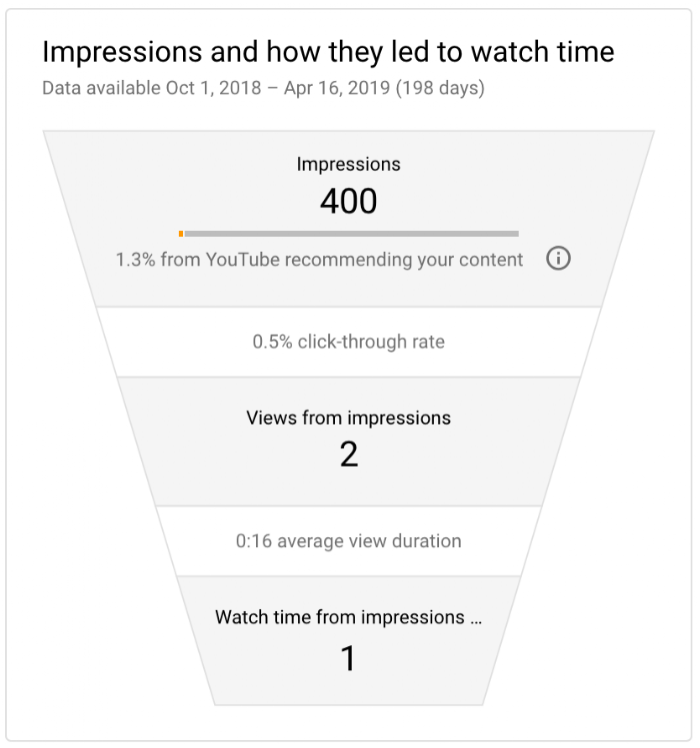
After each upload, compare four reports against your own similar videos: impressions click-through rate, average view duration with the retention graph, new versus returning viewers, and traffic sources.
Don’t panic about a low click-through rate (CTR). Todd Beaupré said (2026): “probably all your videos have about maybe a 10% or less click-through rate. […] That means that even your best videos 90% of the time your subscribed audience isn’t deciding to watch.”
CTR alone misleads. In a 2025 illustration, Beaupré asked: “would you as a Creator rather have a video that has a 20% CTR and 10,000 views […] or a 5% CTR and 100,000 views”.
Returning viewers are the report most people skip. Paddy Galloway admitted (2026): “we all got so obsessed with just maximizing views that we kind of forgot how important a returning viewer is”.
vidIQ and TubeBuddy put these on a dashboard, but Studio has all four reports free. More options in my YouTube tools roundup.
19. Pick one format YouTube is investing in
Read Neal Mohan’s yearly letter and the Made on YouTube announcements. Then pick ONE format that fits a skill you have. Talk well? Try a filmed podcast. Only a phone? Shorts. Patient editor? TV-length episodes. Comfortable live? Vertical live. Explainers? Leave auto-dubbing on. Don’t do it all.
Shorts “now averages 200 billion daily views”, per Mohan’s 2026 letter, up from “over 70 billion daily views” in 2024. YouTube has “more than 1 billion monthly active viewers of podcast content” (2025). “TV is now the primary device for YouTube viewing in the U.S.” (2025 letter). More in my YouTube statistics.
“Auto dubbing is now available to everyone,” says YouTube’s February 2026 post. A dub added later is treated as a new video for that language, per Rene Ritchie (2026): “So, there’s no penalty for doing it.”
Picking one format won’t hurt the others. Todd Beaupré said (2026) YouTube matches each viewer by “a format, a length, a topic”. The reason to pick one is your time.
ElevenLabs covers languages and voices auto-dubbing doesn’t. For podcasts, Castmagic turns episodes into show notes and clips.
20. Go live and clip your streams
Keep live replays public and cut the best moments into Shorts. If you run a podcast, publish full episodes on YouTube as well as the clips.
One creator posted on Reddit (2025) about vertical phone streams from a gym: “My channel was dead—1,200 subs from years-old videos. Today, I’ve hit 20K subs, 35K watch hours, and my most viral clip (pulled from a live stream) has 1.9M views”. That’s the poster’s claim, over four months, not YouTube’s.
Clipping is now partly automatic: “AI-powered highlights turn live content into lasting content,” per YouTube’s blog (2025). And “over 30% of daily logged-in YouTube viewers watched live content in Q2 2025”.
Rene Ritchie put it directly (2025): “If you’re like a a streamer and you’re going live and you’re making great community, but you’re not getting a lot of reach, clip those up into Shorts.” At NAB 2026 he added: “we’ve seen putting those lives up does help the channel.”
StreamYard streams from a browser. Riverside records podcast-quality video, and Castmagic handles the clips.
21. Post on a schedule you can keep
Pick a pace you can hold for a year. If you’re unsure, run one video a week for a few weeks, then two a week, and compare average views per viewer. Keep subscriber notifications on. And maybe take the break when you need it.
That test is Rene Ritchie’s from NAB 2026. On notifications, Todd Beaupré said (2026): “I wouldn’t advise people to turn off” notifying subscribers. Publish time “is not known to impact a video’s long-term performance,” per YouTube’s FAQ.
On breaks, a pro tip with a hedge. Rachel from YouTube’s search and discovery team said in 2021: “We analyzed 40,000 upload breaks that lasted between 8 and 60 days.” They “found that there was no correlation or consistent drops in viewership after taking a break.” That’s a correlation study from 2021, not proof a break is safe for your channel. Don’t bank on it.
The cost is real, though. Roberto Blake said (2019) he did 16,000 to 28,000 views a day when uploading hard, and “maybe 7,000, 8,000, 10,000” during a month off.
What about “free YouTube views” sites?
These sites sell bot views, daily “trial” views or view-for-view exchanges. None of it helps.
VEED Creators tested it in 2023, buying 1,000 views for $4.99 on each of two videos. The retention graph told the story: “This dip here shows that the bots click on the video and then click off again after about one or two seconds”. Zero new subscribers after a month. A clean third video then flopped: “after 24 hours it got zero views and the algorithm is not even pushing it out to anyone because my previous viewers aren’t real.”
u/SeanGalla’s channel jumped from 4K to 16K subscribers from bots (2024): “Yet our view count stayed the same.”
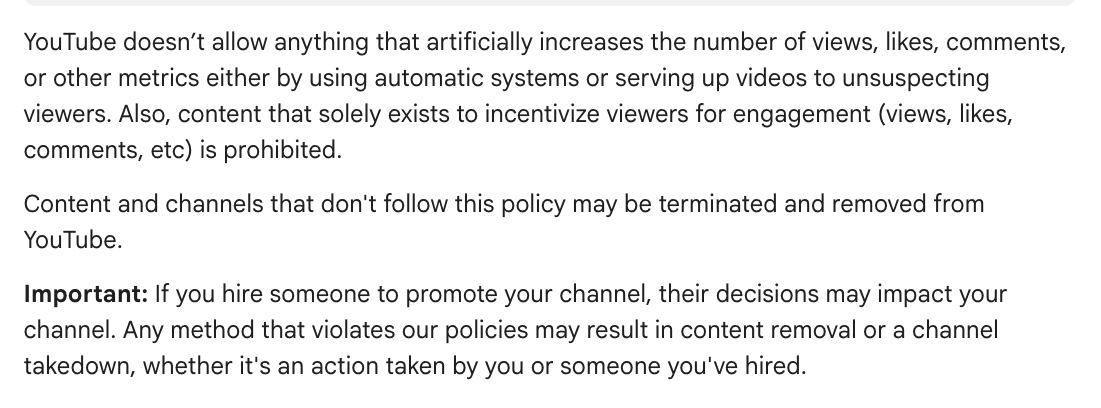
YouTube’s fake engagement policy: “YouTube doesn’t allow anything that artificially increases the number of views, likes, comments, or other metrics either by using automatic systems or serving up videos to unsuspecting viewers.” And: “Page traffic found to be artificial will not be counted on YouTube and can lead to strikes on your account.”
The only allowed paid route is YouTube Promote or Google Ads, and it isn’t free. One Redditor got about 30 views from YouTube ads in 2020. Another went from about 30 views a video to about 10K with Google Ads in 2022.
Frequently asked questions
Is 2,000 views in a day good?
It depends on your channel’s size. For a new channel, it’s a strong day. For a big channel, it might be normal. Compare it with your own similar videos, not other creators, and check how many of those viewers were returning viewers (tactic 18).
How do I get my first 1,000 views?
Pick topics people already search for (tactic 1) and plan for many uploads (tactic 2). Add Shorts with a strong first frame (tactics 4 and 10). If you have a blog or email list, embed and send every new video (tactic 13).
How do I get views with 0 subscribers?
You don’t need them. YouTube’s Todd Beaupré says that when a new channel posts, “there are zero viewers who have that channel in their history”, so YouTube matches the video to viewers’ topic interests instead. Make each video about one clear topic people already watch (tactic 1), and try Shorts (tactic 4).
Does YouTube pay $3 per 1,000 views?
There’s no fixed rate. What you earn per 1,000 views, called RPM (revenue per 1,000 views), varies by niche, audience and format. You also need to be in the YouTube Partner Program before ads pay you anything. My guide on how to make money on YouTube covers the other income options.
Is there a best time to post?
Not for long-term views. YouTube’s FAQ says “Publish time is not known to impact a video’s long-term performance.” A schedule you can keep matters more (tactic 21). For how views are counted, see how YouTube counts views.
Can I get free YouTube views safely?
Only through the 21 tactics above. Bought views, bot views and view-exchange sites break YouTube’s fake engagement policy, and artificial traffic can lead to strikes on your account. In VEED’s test, the bots left within seconds and the next clean video got zero views in its first day.

Written by
Chintan Zalani
Hey, I’m Chintan, a creator and the founder of Elite Content Marketer. I make a living writing from cafes, traveling to mountains, and hopping across cities. Join me on this site to learn how you can make a living as a sustainable creator.
View Profile →Related Articles

Content Marketing
AI-Generated Marketing Content: How to Make It Worth Reading
Most AI-generated marketing content is forgettable. Here’s the workflow, five attributes, three before/after rewrites, and the quality gates that decide what sh
Jun 13, 2026Read more →

Content Marketing
AI-Driven Content Marketing: What ‘AI-Driven’ Actually Means in 2026
AI-driven content marketing is the most overloaded phrase in marketing right now. Here is a 5-level spectrum that names where your team really sits and what to
Jun 11, 2026Read more →

Content Marketing
Content Marketing Automation: What You Can Actually Automate in 2026 (and What Still Breaks)
A function-by-function map of content marketing automation in 2026, what’s mature, what’s risky, what’s still human-only, plus the first three workflows worth a
Jun 9, 2026Read more →